Running Speed — Check & Track Sprint and Jogging Pace Online
Check your jogging pace, interval sprint velocity, 5K/10K tempo splits, or marathon pace. 100% private in your browser — zero tracking, no account needed, and no background battery drain.
How to Check Your Running Speed Online in 3 Simple Steps
-
1. Open the Running Speedometer
Launch this page in Safari, Google Chrome, Firefox, or Edge. If you train regularly, you can install this tool as a Progressive Web App (PWA) for fast 1-tap full-screen access right from your phone’s home screen without downloading anything from an app store.
-
2. Enable GPS & Position Your Device
Tap Start Trip and select “Allow While Using App”. Place your phone in an upper-arm strap, handheld running case, or hydration vest pocket facing upward toward the open sky.
-
3. Monitor Live Athletic Telemetry
As you accelerate into your stride, the digital gauge displays your instantaneous velocity. Switch between KM/H and MPH, or monitor your peak sprint speed, average pace, and accumulated distance in the live telemetry bar below.
Want to monitor longer endurance runs and log distance splits? Explore our Speed Tracker Telemetry Guide.
How GPS Measures a Runner’s Speed Behind the Scenes
Unlike indoor treadmills that calculate pace from belt revolutions, an online GPS Speedometer calculates true outdoor ground speed using two core scientific mechanisms:
- Doppler Velocity Tracking ($\Delta f$): As you run across roads or tracks, the radio waves received from navigation satellites orbiting at 20,200 km altitude undergo a subtle Doppler frequency shift. By measuring these carrier phase variations across 4 or more satellites simultaneously, your phone’s GNSS chip calculates 3D velocity ($v_x, v_y, v_z$) every second.
- Arm Swing Velocity Smoothing: When holding a phone or wearing an armband, natural arm swing creates minor periodic velocity oscillations (±2–4 km/h relative to torso movement). Modern smartphone GNSS chips apply internal Kalman filtering to smooth these micro-accelerations into a steady forward speed reading.
- Geodesic Distance Delta ($\Delta d / \Delta t$): The receiver calculates great-circle displacement between consecutive latitude and longitude fixes using the Haversine formula, tracking cumulative mileage and overall workout duration.
Also cross-training on two wheels? Check your cycling velocity with our Bicycle Speedometer Guide.
Speed vs. Pace: Understanding the Difference
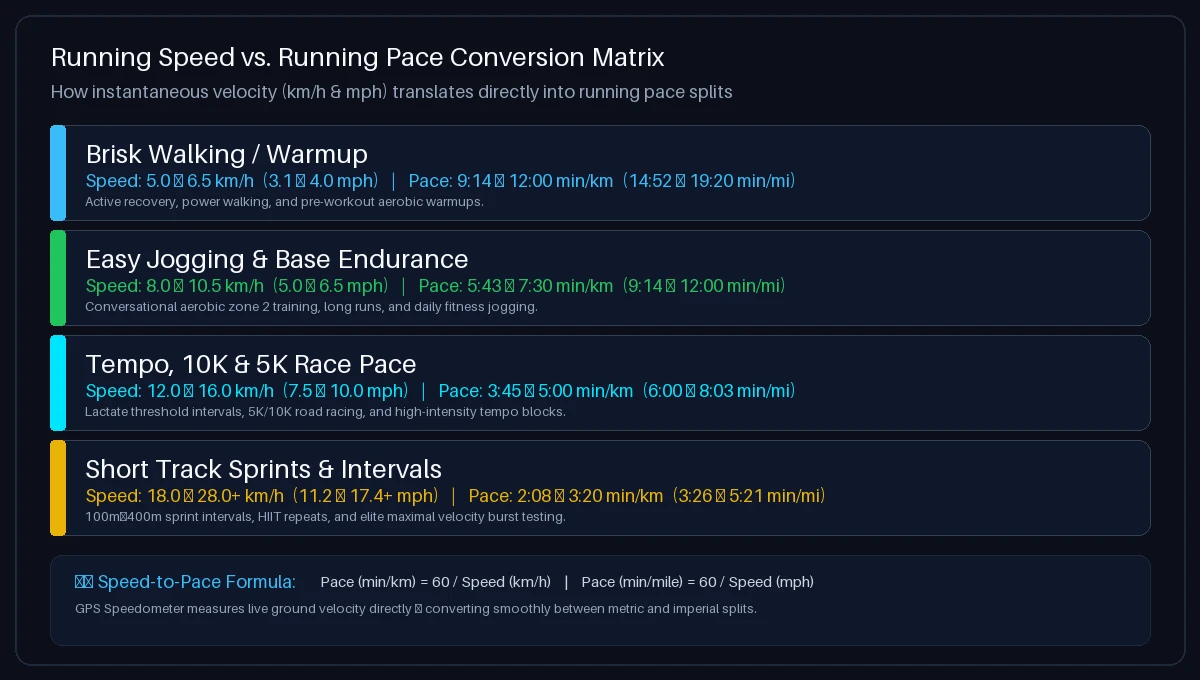
Converting between speed and pace is straightforward using these simple formulas:
- Pace in Minutes per Kilometer: $\text{Pace (min/km)} = \frac{60}{\text{Speed (km/h)}}$
- Pace in Minutes per Mile: $\text{Pace (min/mile)} = \frac{60}{\text{Speed (mph)}}$
Here is a quick reference table comparing running speed benchmarks with their equivalent pace splits:
| Activity Tier | Speed (km/h) | Speed (mph) | Pace (min/km) | Pace (min/mi) |
|---|---|---|---|---|
| Brisk Walking | 5.0 – 6.0 km/h | 3.1 – 3.7 mph | 10:00 – 12:00 | 16:05 – 19:20 |
| Easy Jogging | 8.0 – 10.0 km/h | 5.0 – 6.2 mph | 6:00 – 7:30 | 9:40 – 12:00 |
| Tempo / 10K Pace | 12.0 – 14.0 km/h | 7.5 – 8.7 mph | 4:17 – 5:00 | 6:53 – 8:03 |
| 5K Race Pace | 14.0 – 16.5 km/h | 8.7 – 10.3 mph | 3:38 – 4:17 | 5:50 – 6:53 |
| Sprint Intervals | 20.0 – 28.0+ km/h | 12.4 – 17.4+ mph | 2:08 – 3:00 | 3:26 – 4:50 |
Need to convert track splits or treadmill speeds between metric and imperial units? Use our interactive Speed Converter Calculator.
Factors Affecting Running GPS Speed Readings & Device Placement

Keep these physical factors in mind when tracking your outdoor runs:
- Upper Arm Band vs. Deep Pocket: Positioning your phone in an upper-arm strap gives the internal GPS antenna a clear 180-degree view of overhead satellites. Carrying the phone in a loose shorts pocket places human body mass directly between the antenna and low-horizon satellites, reducing signal strength by 25–40%.
- Tree Canopy & Trail Running: Wet leaves on dense forest trails absorb high-frequency satellite microwave signals. On heavily wooded trails, speed readings may experience slight smoothing latency. Open paved roads and athletic tracks deliver maximum precision.
- 400m Oval Athletic Tracks: When running around a standard 400m track, continuous cornering can cause second-by-second GPS coordinate cutting across the curves. Instantaneous Doppler speed remains highly accurate, but total distance may measure 1–2% shorter than actual lane distance.
- Stationary Filter: When stopping at pedestrian crosswalks or tying your shoes, our built-in threshold filter keeps the speedometer locked at 0.0 to prevent minor coordinate drift from artificially inflating your workout mileage.
To learn more about GNSS satellite technology and calibration, read our Speedometer Accuracy Test Guide.
Runner Safety Guidelines: Eyes on the Trail and Traffic
Follow these best practices to ensure safe and effective running speed checks:
- Set Up Before You Start: Open the webpage, select your preferred unit (KM/H or MPH), tap Start Trip, and secure your phone in your armband or running belt before beginning your warmup.
- Glanceable UI: Our large high-contrast digital gauge is optimized for quick split-second glances so you can check your speed without breaking stride or losing focus on footing.
- Review Stats Post-Run: Review your peak sprint speed, average moving velocity, and total distance after you finish your run and come to a safe stop.
Want a quick conversational check of your speed right now? Try our live How Fast Am I Going Tool.
Troubleshooting: Running Speed Not Updating or GPS Blocked?
Follow these quick troubleshooting steps:
- iPhone / iPad (Safari): Go to iOS Settings → Privacy & Security → Location Services. Select Safari Websites, choose “While Using the App”, and confirm that “Precise Location” is toggled ON.
- Android (Google Chrome): Tap the Tune / Padlock icon in Chrome’s address bar → tap Permissions → Location → select “Allow”. Ensure Android high-accuracy location mode is active in system settings.
- Indoor Treadmill Limitation: Satellite radio waves cannot penetrate residential ceilings or gym roofs. This GPS speedometer is designed exclusively for outdoor running on roads, parks, and tracks.
Frequently Asked Questions About Running Speed
How can I check my running speed online?
To check your running speed online, open Running Speed Tracker in your mobile browser, tap “Start Trip”, allow location permissions, and head outdoors. Your live running velocity will display immediately in km/h or mph using satellite GPS.
What is an average running speed for beginners?
For beginner runners and casual joggers, a typical average running speed is 8.0 to 10.0 km/h (5.0–6.2 mph), which translates to a pace of 6:00 to 7:30 min/km (9:40–12:00 min/mile).
How fast do humans run at top sprint speed?
Recreational runners typically sprint between 20 and 26 km/h (12.4–16.2 mph) during interval training. Elite world-class sprinters (such as Usain Bolt) have achieved peak instantaneous velocities exceeding 44.7 km/h (27.78 mph).
How accurate is a phone GPS speedometer for running?
Under open sky conditions with a clear satellite fix, an online GPS running speedometer is typically accurate to within ±0.1 m/s (approx. 0.36 km/h or 0.22 mph) at steady running paces.
Does this tool work on an indoor treadmill?
No. GPS speed measurement requires direct line-of-sight to orbiting satellites, which are blocked by gym ceilings and buildings. This tool is designed specifically for outdoor running, jogging, and sprinting.
Do I need to download an app to track my running speed?
No. This speedometer operates entirely in your web browser via HTML5 Geolocation. You can also save it as a Progressive Web App (PWA) for fast home screen access without visiting an app store.
Does this website save or upload my running route?
No. Your privacy is 100% protected. All GPS velocity calculations and workout statistics are processed locally in your device’s browser memory. Zero location or route data is ever transmitted to or stored on our servers.
How do I switch between KM/H and MPH on the running speedometer?
Tap the KM/H or MPH pill buttons directly below the dial. The digital display, gauge scale, and trip statistics will convert synchronously.
Why does the speedometer show 0.0 when I stop to rest?
When you come to a complete stop, our stationary threshold filter locks the display to 0.0 to prevent minor satellite drift from artificially adding distance to your workout while you catch your breath.
Can I use this tool for cycling or driving as well?
Yes. The tool operates anywhere satellite signals are received. For dedicated transportation guides, check out our Bicycle Speedometer and Car Speed Test.