Speed Tracker — Real-Time GPS Speed Monitor & Telemetry
Monitor live driving speed, bicycle pace, transit velocity, or athletic sprint performance. Real-time telemetry processed 100% privately in your browser — zero tracking, no account required, and no battery-draining background logging.
How to Track Your Speed Online in 3 Simple Steps
-
1. Launch the Online Speed Monitor
Access this tool directly in Safari, Google Chrome, Firefox, or Edge. If you track your commute or workouts daily, you can install this tool as a Progressive Web App (PWA) for instant 1-tap full-screen access right from your phone’s home screen.
-
2. Enable GPS & Position Your Device
Click Start Trip. When prompted by your browser, choose “Allow While Using App”. Mount your phone in a secure windshield cradle when driving, or hold it facing the open sky when walking, running, or cycling.
-
3. Monitor Live Velocity & In-Session Telemetry
As you begin moving, the digital gauge displays your instantaneous speed. The telemetry dashboard at the bottom calculates your maximum velocity, average pace, elapsed duration, and total distance traveled in real time.
Looking for a quick, conversational check of your current speed right now? Try our dedicated How Fast Am I Going Live Tool.
How GPS-Based Speed Tracking Works Behind the Scenes
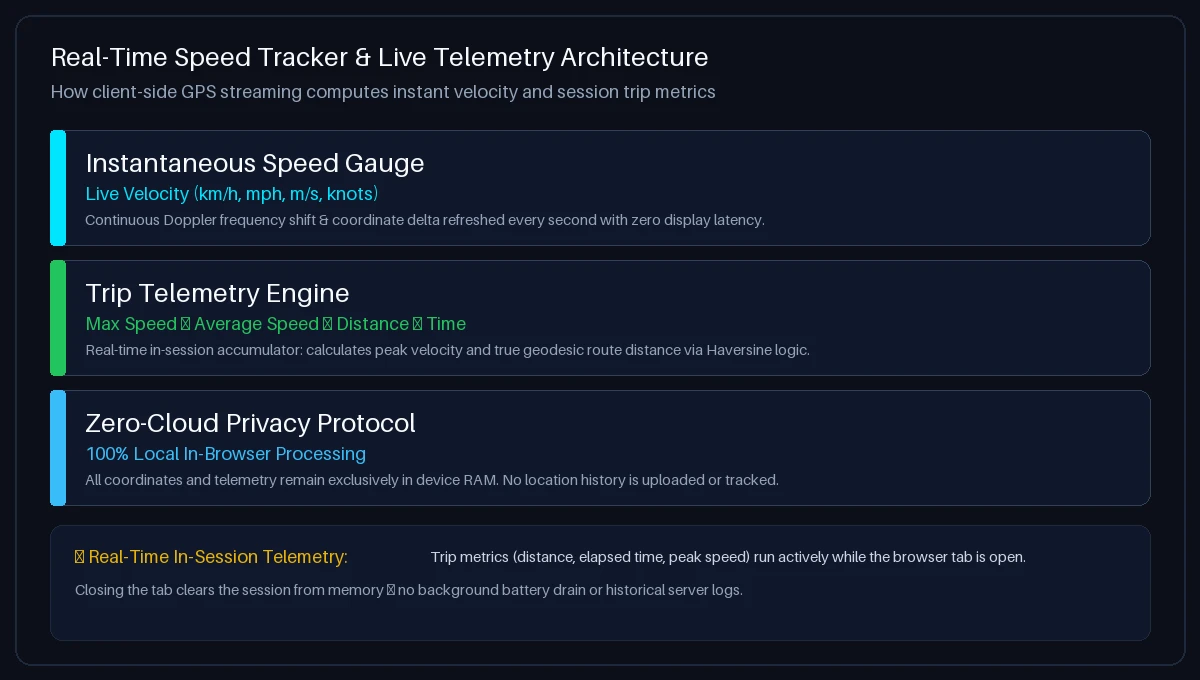
Unlike vehicle wheel sensors that measure axle revolutions, a browser-based GPS Speedometer calculates ground velocity through two complementary mathematical principles:
- Doppler Velocity Tracking ($\Delta f$): As your device moves across terrain, radio signals broadcast from GNSS satellites orbiting at 20,200 km altitude shift in frequency. By measuring these carrier phase frequency shifts across 4 or more satellites simultaneously, the GNSS chip calculates 3D velocity vectors ($v_x, v_y, v_z$) with sub-second responsiveness.
- Geodesic Distance & Average Speed ($\Delta d / \Delta t$): The tracking engine logs consecutive latitude and longitude coordinate fixes, computing great-circle displacement via the Haversine formula. Dividing total accumulated distance by active moving time yields your true average trip speed.
Want to verify the calibration of your car’s dashboard dial against GPS telemetry? Read our Speedometer Accuracy Test Protocol.
Speed Units: MPH vs. KM/H and Conversion Standards
You can toggle between international measurement units with a single tap during your journey:
- Kilometers per Hour (km/h): Standard for road transit, cycling, and automotive speed limits in over 180 countries worldwide.
- Miles per Hour (mph): The official road velocity standard in the United States and the United Kingdom.
- Meters per Second (m/s): The SI scientific standard, useful for physics experiments, wind analysis, and sprint acceleration ($1\text{ m/s} = 3.6\text{ km/h} \approx 2.237\text{ mph}$).
- Knots (kn): Nautical miles per hour, standard for sailing, motor boating, and aviation ($1\text{ knot} = 1.852\text{ km/h} \approx 1.151\text{ mph}$).
Need to convert speed limits or travel records between units? Use our interactive Speed Converter Calculator.
Speed Monitoring vs. Continuous Trip Logging: Understanding the Difference

To set accurate expectations, here is a transparent breakdown of what our web-based tool does and does not do:
- What This Web Tool Does (Live In-Session Telemetry):
- Calculates instantaneous speed, maximum speed, average moving pace, elapsed time, and total trip distance.
- Features a night-driving HUD (Head-Up Display) mode that mirrors the readout onto your car windshield.
- Processes 100% of data locally in browser RAM for complete privacy — zero data is sent to or stored on servers.
- Resets the telemetry session cleanly when the tab is closed, preventing battery drain or unwanted background tracking.
- What This Web Tool Does Not Do (Native App / Hardware Scenarios):
- It does not record background GPS tracks when your phone screen is locked or the browser tab is closed.
- It does not save permanent map breadcrumbs, GPX files, or user accounts to the cloud.
- It does not connect to vehicle OBD-II engine computers or broadcast fleet management telematics.
Factors Affecting GPS Speed Readings & Environmental Accuracy
To understand what shapes your speed readings in different environments, consider these physical factors:
- Open Highways & Rural Roads: Optimal conditions. Your smartphone locks onto 12–18 satellites across GPS, Galileo, GLONASS, and BeiDou, maintaining steady sub-second velocity precision of ±0.1 m/s (±0.36 km/h).
- Urban Canyons & Skyscrapers: In dense downtown corridors, glass and steel building facades reflect satellite signals before they reach your phone (multipath reflection). This can cause brief speed jitter of ±1–3 km/h until you reach open roadways.
- Underground Tunnels & Parking Garages: Solid rock and concrete block satellite radio signals completely. The speedometer will automatically hold the last known speed and resume tracking within 3–8 seconds after exiting back into open air.
- Device Placement: Placing your phone on a windshield mount gives it direct sky visibility. Burying the phone in a deep pocket, backpack, or closed glove box degrades signal strength by 40–70%.
Practical Use Cases: Cars, Bikes, Transit & Running Pace
This versatile GPS speed tracker adapts to multiple transportation modes and activities:
- Automotive Speedometer Check: Verify the accuracy of your vehicle’s dashboard dial or check speed if your mechanical speedometer is malfunctioning. Learn more in our Car Speed Test Guide.
- Bicycles & Electric Scooters: Mount your phone to your bike handlebars to monitor cruising pace, sprint speeds, and distance without buying expensive cycling computers. Check out our Bicycle Speedometer Guide.
- Public Transit Commuters: Check how fast your bus or train is traveling from your passenger seat. Read our guides for bus speed testing and train speed tracking.
- Running & Sprint Training: Monitor athletic running velocity, interval sprints, and average pace on open tracks. Explore our Running Speed Guide.
- Boats & Aviation: Track boat cruising speed in nautical knots (boat speedometer) or measure passenger airplane ground speed (flight speed tracking).
Crucial Driver Safety Guidelines: Never Interact While Driving
Always follow these strict safety precautions when using this tool in a car:
- Set Up Before Driving: Launch the webpage, tap Start Trip, choose your preferred unit (KM/H or MPH), and mount your phone in a secure windshield or dashboard cradle before putting the car in gear.
- Use Hands-Free Line of Sight: Position the mount so the large high-contrast digital display is easily readable at a quick glance without obstructing your view of the road.
- Leverage Night HUD Mode: When driving at night, enable HUD Mode and place your phone flat on the dashboard below the windshield to view a mirrored speed projection directly in your forward field of vision.
- Delegate to Passengers: If you need to change settings, switch units, or review trip telemetry while underway, ask a passenger to operate the device for you.
Troubleshooting: Speed Tracker Not Updating or GPS Blocked?
Follow these quick troubleshooting steps for your device:
- iPhone & iPad (Apple Safari): Open iOS Settings → Privacy & Security → Location Services. Select Safari Websites, choose “While Using the App”, and make sure “Precise Location” is switched ON.
- Android (Google Chrome): Tap the Tune / Lock icon in Chrome’s address bar → tap Permissions → Location → select “Allow”. Ensure Android system location mode is set to “High Accuracy”.
- Desktop & Laptop Browsers: macOS and Windows require system-level Location Services to be enabled in System Settings before browsers can access positioning hardware.
- Stationary Filter: When completely stopped, the tool displays 0.0 to prevent minor satellite drift from creating erratic readings. The display will update as soon as you exceed 1 km/h of physical movement.
Frequently Asked Questions About Speed Tracking
What is an online speed tracker?
An online speed tracker is a web-based tool that calculates and displays your real-time moving velocity in km/h or mph using your device’s built-in GPS receiver, with no app downloads or hardware sensors required.
How do I track my speed using my phone?
Open Speed Tracker in your mobile browser, tap “Start Trip”, grant location permissions, and keep your phone in an open area. Your live speed, peak velocity, average pace, and trip distance will track automatically as you move.
How accurate is an online GPS speed tracker?
Under open sky conditions with a clear satellite fix, an online GPS speed tracker is typically accurate to within ±0.1 m/s (approx. 0.36 km/h or 0.22 mph) at steady cruising speeds.
Does this speed tracker save my trip history or location?
No. Your privacy is 100% guaranteed. All GPS velocity calculations and trip statistics are processed locally in your device’s browser memory. Zero location coordinates or trip records are ever uploaded to or stored on our servers.
Does this tool track speed in the background when the phone is locked?
No. Standard web browsers do not permit continuous background GPS polling when the phone screen is locked or the tab is closed. The tracker runs actively while the webpage is open on your screen.
Can I use this speed tracker on a car, bicycle, or boat?
Yes. The tool operates anywhere satellite signals are received. It works seamlessly in cars (car speed test), on bicycles (bike speedometer), on buses and trains (bus speed test, train speed tracker), and on boats (boat speedometer).
What is HUD mode and how do I use it?
HUD (Head-Up Display) mode inverts the speedometer readout vertically. At night, place your smartphone face up on your car dashboard below the windshield to reflect your live speed directly into your forward line of sight.
How do I switch between MPH, KM/H, M/S, and Knots?
Tap any of the unit pill buttons (км/ч, миль/ч, м/с, узлы) located directly below the speedometer dial. The digital display, gauge scale, and trip statistics will convert synchronously.
Why does the speedometer show 0.0 when I am standing still?
When you are stationary, minor atmospheric fluctuations in satellite signals can cause small coordinate drift. Our engine applies stationary threshold filtering to keep the display locked at 0.0 until actual physical movement occurs.
Do I need an internet connection to keep tracking speed?
Once the webpage is loaded in your browser (or installed as a PWA), speed calculations rely entirely on your phone’s internal GPS satellite receiver and do not require continuous cellular data.