Car Speed Test — Check & Verify Your Vehicle Speed Online
Test and verify your car’s current driving speed, check speedometer calibration after tire changes, and log maximum and average trip velocity — 100% private in your browser, no OBD-II hardware or app download required.
How to Check Your Car Speed Online in 3 Steps
-
1. Launch the In-Car Speedometer
Open this page on your mobile browser (Safari, Chrome, or Edge). If you drive frequently, you can install this tool as a Progressive Web App (PWA) for fast 1-tap full-screen access from your phone’s home screen.
-
2. Mount Your Phone & Enable GPS
Secure your smartphone in a windshield or air vent cradle with a clear view through the front glass. Tap Start Trip and select “Allow While Using App” to allow HTML5 Geolocation to access your device’s multi-constellation satellite chip.
-
3. Accelerate & Monitor Driving Telemetry
As you merge onto the road, the digital gauge displays your instantaneous vehicle speed. Select your preferred unit (км/ч or миль/ч) or switch to HUD Mode (⚙️) for nighttime windshield projection.
During your drive, the bottom telemetry panel continuously calculates your maximum speed, average moving pace, and total odometer distance. For comprehensive trip analysis, explore our Speed Tracker Telemetry Guide.
How GPS Measures Real-Time Vehicle Speed
While mechanical vehicle speedometers rely on wheel rotations, a GPS Speedometer calculates true physical ground velocity via two complementary methods:
- Doppler Frequency Shift (Δf): As your car travels along the highway, the frequency of radio carrier waves transmitted by satellites orbiting at 20,200 km altitude shifts according to the relativistic Doppler effect. By comparing phase shifts from 4 or more satellites simultaneously, the GPS receiver solves for a 3D velocity vector (vx, vy, vz) every second with minimal latency.
- Geodesic Distance Delta (Δd/Δt): The receiver calculates distance between consecutive coordinate fixes using the Haversine formula over measured time elapsed, verifying steady-state trajectory and total road mileage.
Car Speed Measurement: MPH vs. KM/H
You can toggle between units on the fly during your car speed test:
- Kilometers per Hour (km/h): Standard on highway speed limit signs, speed cameras, and vehicle clusters across 160+ countries globally.
- Miles per Hour (mph): The official legal speed standard for automotive traffic in the United States and the United Kingdom.
- Knots (kn) & Meters per Second (m/s): Available for specialty marine transit (boat speedometer) and physics calculations.
Driving an imported vehicle with a single-unit speedometer cluster? Use our Speed Converter Calculator to quickly translate speed limits between mph and km/h.
GPS Speed vs. Car Dashboard Speedometer: Why Dials Differ
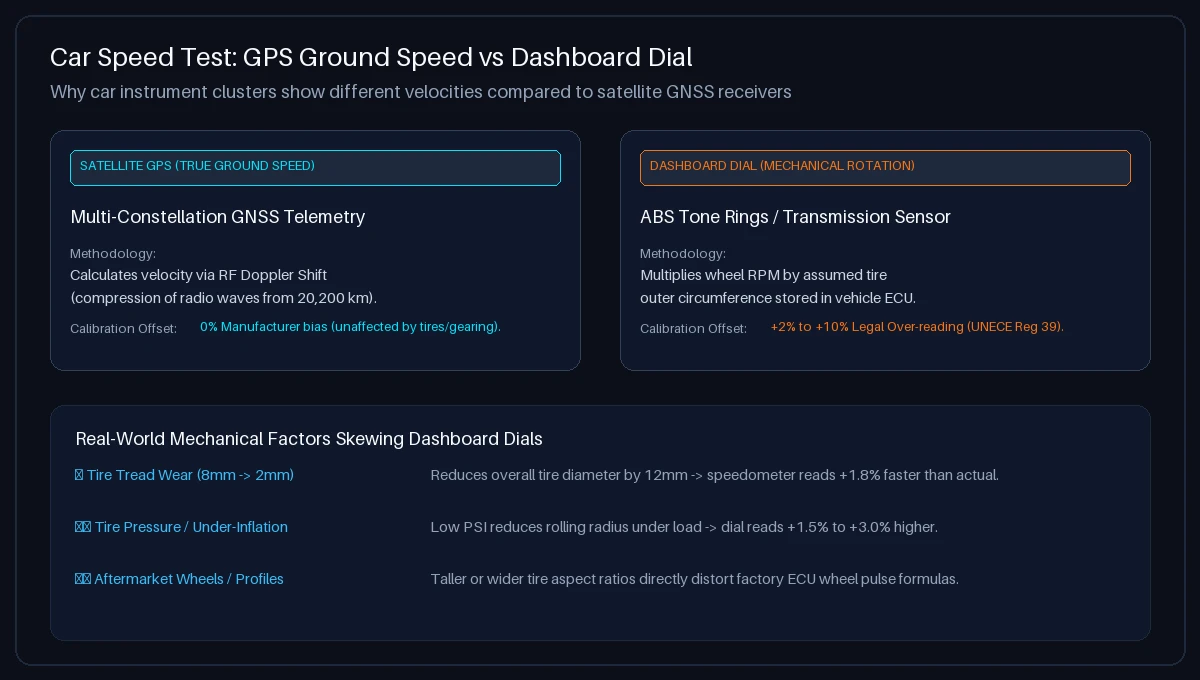
| Operational Feature | GPS Car Speed Test (Online) | Factory Dashboard Speedometer |
|---|---|---|
| Velocity Source | Satellite GNSS Doppler Shift (True Ground Speed) | Wheel ABS Tone Rings / Transmission Output Shaft |
| Manufacturer Over-Reading Buffer | 0% (Unbiased scientific calculation) | +2% to +10% positive offset by legal safety mandate |
| Tire Tread Wear (8mm → 2mm) | No effect (Independent of wheel diameter) | Reduces rolling diameter, causing dial to read +1.8% faster |
| Tire Pressure / Under-Inflation | No effect (Direct ground displacement) | Low PSI reduces dynamic rolling radius, increasing dial error |
| Aftermarket Wheels & Tires | No effect (Measures physical vehicle velocity) | Taller or wider tire profiles distort factory ECU pulse ratios |
Want to run a structured, step-by-step benchmark on your vehicle’s cluster? Follow our Speedometer Test Protocol Guide.
Factors Affecting In-Car GPS Readings & Practical Tips
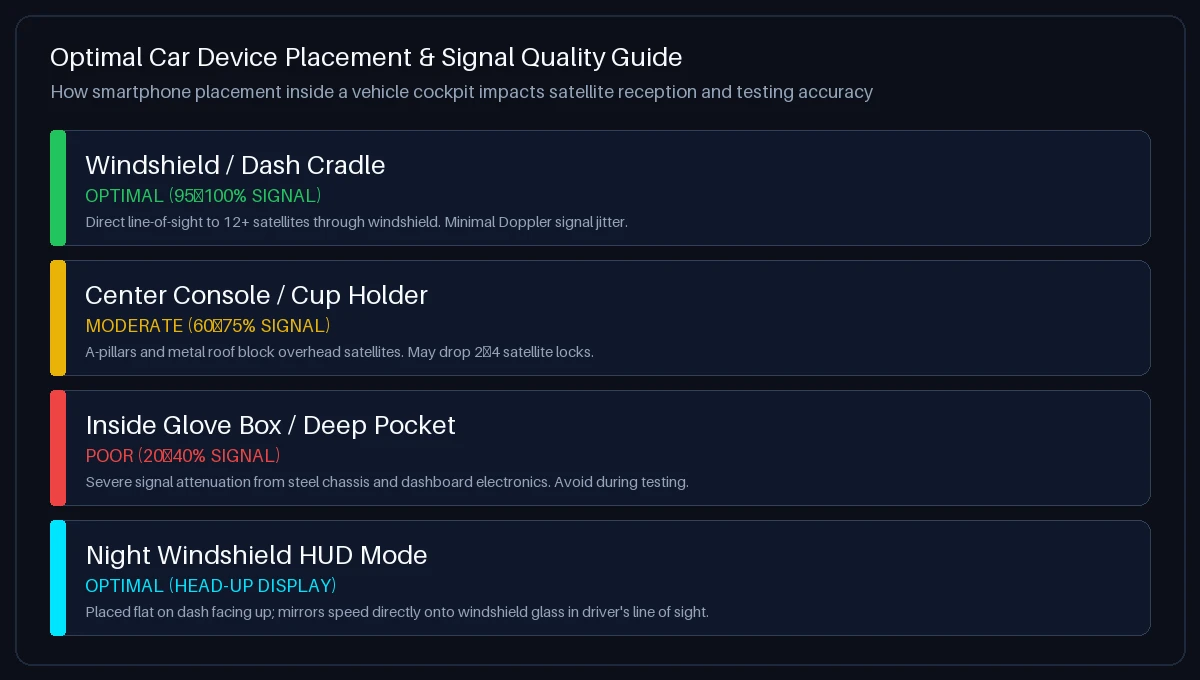
Apply these practical recommendations during your car speed test:
- Position Your Phone Near Glass: A phone mounted on the windshield or center dashboard receives direct radio lines-of-sight to 12–18 satellites. Placing your phone deep inside a center console, cupholder, or pocket attenuates satellite signals through the metal roof and pillars.
- Watch for Thermal / Metallic Windshield Tints: Some luxury vehicles feature acoustic or infrared-reflective windshield glass with metallic oxide films that can attenuate RF signals. If signal lock is slow, place your phone near the ceramic dot matrix behind the rearview mirror.
- Test at Steady Highway Speeds: GPS Doppler velocity achieves optimal precision (±0.1 m/s) during steady cruise control driving. During sudden emergency braking or aggressive acceleration, GPS speed displays a 0.5–1.0 second sensor update latency.
- Use Windshield HUD Mode at Night: Tap the settings gear (⚙️) and select HUD Mode. Place your phone face up on the dashboard beneath the windshield; the inverted display reflects a bright, focused digital speedometer directly in your line of sight.
Curious about how your vehicle speed compares to other transit modes? Check out our guides for motorcycle speedometer testing, bus speed testing, and train speed tracking.
Troubleshooting: Car Speed Not Showing or GPS Blocked?
Follow these platform-specific steps to restore in-car GPS connectivity:
- Apple iOS (iPhone Safari): Go to Settings → Privacy & Security → Location Services. Ensure Location Services is ON. Tap Safari Websites, select “While Using the App”, and ensure “Precise Location” is toggled ON.
- Android (Google Chrome): Tap the Tune / Padlock icon in Chrome’s address bar → tap Permissions → Location → select “Allow”. Ensure Android high-accuracy location mode is active.
- Exiting Tunnels & Parking Garages: Satellite radio waves cannot penetrate underground concrete or mountain tunnels. The tool will temporarily pause speed updates and automatically re-lock within 3–8 seconds after exiting.
Frequently Asked Questions About Car Speed Testing
How can I check my car speed online without an app?
You can check your car speed directly in your smartphone browser by opening Car Speed Test, tapping “Start Trip”, and allowing location permissions. Modern mobile browsers read your phone’s internal GPS receiver via HTML5 Geolocation, displaying live velocity in km/h or mph without requiring app store downloads.
Why is my car speedometer reading faster than the GPS speed?
Car manufacturers intentionally calibrate vehicle speedometers to read 2% to 10% higher than actual speed to comply with international regulations (such as UNECE Regulation 39). These laws strictly prohibit speedometers from ever under-reporting true vehicle velocity.
How accurate is GPS for measuring car speed?
Under open sky conditions with a clear satellite lock, smartphone GPS speed measurement is typically accurate to within ±0.1 m/s (approx. 0.36 km/h or 0.22 mph) at steady cruising speeds.
How do different tire sizes affect my car’s speedometer?
Vehicle speedometers measure wheel revolutions. If you install larger tires, your car travels farther per rotation than the factory ECU expects, causing your dashboard to read slower. Smaller or heavily worn tires cause the dashboard to read faster. GPS speed measures true ground displacement regardless of tire size.
Where is the best place to put my phone for accurate car speed testing?
Mount your smartphone on the windshield or dashboard with an unobstructed view through the front glass. Avoid placing the phone deep inside cupholders, glove boxes, or pockets where the metal car chassis attenuates satellite radio reception.
What is HUD mode and how do I use it in my car?
HUD (Head-Up Display) mode vertically mirrors the digital speedometer readout. At night, place your smartphone face up on your dashboard below the windshield; the inverted reflection projects your real-time driving speed onto the windshield directly in your line of sight.
Does this car speed test store or share my driving location?
No. Your driving data is completely private. All GPS coordinates and speed telemetry are calculated locally in your phone’s browser memory. Zero location or trip history data is ever sent to or stored on our servers.
Can I use this car speedometer test offline?
Yes. Once this page is loaded or installed as a Progressive Web App (PWA), your phone’s internal hardware GPS continues to receive satellite radio signals and calculate speed even when driving through areas with no cellular reception.
How do I switch between MPH and KM/H during a drive?
Tap the км/ч or миль/ч pill buttons directly below the speedometer dial. The digital display, dial markings, and trip statistics will immediately update synchronously.
What is the difference between my current car speed and average trip speed?
Current car speed is your instantaneous velocity right now (the large gauge display). Average trip speed is your total accumulated distance divided by elapsed travel time, shown in the telemetry bar below the speedometer.