How Fast Am I Going? — Check Your Current Speed Online
Whether you are driving in a car, riding a train or bus, cycling, or running outdoors, this tool measures your true ground velocity directly in your web browser — 100% private, no app download required.
How to Check Your Current Speed Online in 3 Steps
-
1. Launch the Online Speedometer
Keep this page open on your smartphone, tablet, or laptop. If you want instant 1-tap access from your home screen without opening a browser tab each time, you can install it as a Progressive Web App (PWA).
-
2. Enable Location Access
Click Start Trip. When prompted by Safari, Chrome, or Edge, select “Allow While Using App”. This activates the standard HTML5 Geolocation interface to read high-precision satellite signals directly from your device hardware.
-
3. View Live Speed & Telemetry
As you begin moving, the digital gauge displays your instantaneous velocity. Use the unit selector pills to switch between km/h and mph, or use the mode button (⚙️) to toggle Digital Only, Analog Dial, or Windshield HUD Mode.

During your trip, the telemetry dashboard tracks your maximum speed, average pace, and total distance. For detailed logging and trip analysis, explore the Speed Tracker Telemetry Guide.
How Does GPS Calculate How Fast You Are Moving?
Unlike vehicle speedometers that measure the rotational speed of car axles or wheel hubs, a GPS Speedometer calculates true velocity relative to the Earth’s surface through two scientific methodologies:
- Doppler Frequency Shift (Δf): As your device moves relative to navigation satellites orbiting at 20,200 km altitude, the frequency of satellite radio carrier signals shifts according to the relativistic Doppler effect. By comparing simultaneous carrier phase shifts from 4 or more satellites, the GPS receiver solves for an instantaneous 3D velocity vector (vx, vy, vz) every second with millisecond latency.
- Position Delta over Time (Δd/Δt): When Doppler signals encounter brief interference, the receiver calculates the geodesic distance between successive latitude and longitude coordinates (φ₁, λ₁) and (φ₂, λ₂) over elapsed time (Δt) using the Haversine trigonometric formula.
Modern mobile chipsets track multiple Global Navigation Satellite Systems (GNSS) simultaneously — including GPS (USA), Galileo (European Union), GLONASS (Russia), and BeiDou (China) — providing exceptional resilience and accuracy across varying terrain.
Checking Speed in MPH vs. KM/H
Online Speedometer lets you switch between 4 international velocity standards with a single tap on the unit bar:
- Kilometers per Hour (km/h): The universal standard for traffic speed limits, highway radar, and automotive dashboards in Europe, Canada, Australia, Asia, Africa, and Latin America.
- Miles per Hour (mph): The primary unit for speed limits and highway signage in the United States, the UK, and several Caribbean nations.
- Meters per Second (m/s): The fundamental SI unit for physics, engineering, and athletic sprinting (running speed tracking). 1 m/s = 3.6 km/h ≈ 2.237 mph.
- Knots (kn): Equal to one nautical mile per hour (1.852 km/h). Essential for marine navigation on boats and aviation ground speed on commercial flights.
Need to calculate exact unit conversions for specific speed limits or athletic paces? Use our interactive Speed Converter Tool.
How Accurate Is the Speed Reading, and What Affects It?
To understand why your speed readout might occasionally fluctuate, consider these primary environmental factors:
- Satellite Line-of-Sight & Urban Canyons: In open countryside and on wide highways, your phone maintains direct visibility to 10–18 satellites with low Dilution of Precision (DOP < 1.5). In dense metropolitan areas surrounded by high-rise skyscrapers, radio signals can reflect off glass and concrete (multipath error), causing temporary signal jitter.
- Tunnels and Underground Parking: Satellite radio waves cannot penetrate thick reinforced concrete or subterranean rock. Inside tunnels, GPS speed updates pause and automatically resume once you exit.
- Steady Velocity vs. Sudden Deceleration: GPS speed is extraordinarily precise during steady-state cruising (such as driving on a highway or cycling). During sudden, violent emergency braking, GPS updates may lag by 0.5 to 1.0 second compared to instantaneous mechanical wheel sensors.
- Stationary Drift at Zero Speed: When standing completely still, atmospheric satellite variance can cause the digital readout to flicker between 0.0 and 0.5 km/h. The speedometer engine applies stationary threshold filtering to keep the dial at 0 when you are stopped.
Want to benchmark your vehicle’s dashboard against certified GPS readings? Follow our step-by-step Speedometer Accuracy Test Protocol.
Where Can You Use This Speedometer?
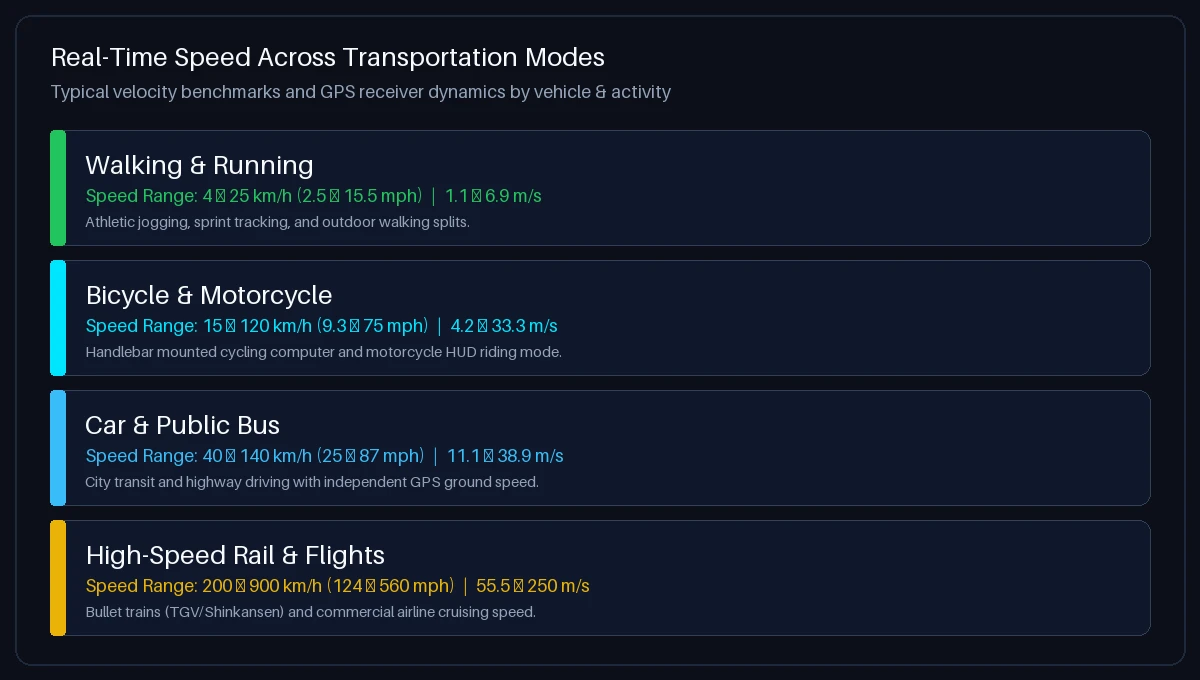
Why Does My Car Speedometer Differ From GPS Speed?
| Comparison Metric | GPS Speedometer (Online) | Vehicle Dashboard Speedometer |
|---|---|---|
| Measurement Source | Satellite GNSS Doppler Shift (Ground Velocity) | Transmission Sensor / ABS Wheel Ring Rotation |
| Manufacturer Over-Reading Margin | Zero (Calculates true scientific velocity) | +2% to +10% higher by legal regulatory design |
| Impact of Tire Wear | None (Independent of vehicle mechanics) | Worn tire tread reduces diameter, increasing error (+1.5%) |
| Impact of Aftermarket Wheels | None (Measures true ground distance) | Larger or smaller tires skew readings by 3%–10% |
| Multi-Vehicle Compatibility | Universal (Car, bike, bus, train, boat, running) | Built-in to one vehicle only |
For a detailed technical guide on how wheel circumference formulas affect automotive odometers, read our Car Speedometer Calibration Guide.
Troubleshooting: Speed Not Showing or GPS Blocked?
Follow these platform-specific instructions to restore GPS access:
- Apple Safari (iPhone / iPad): Open iOS Settings → Privacy & Security → Location Services → select Safari Websites → choose “While Using the App” and enable “Precise Location”. Reload the web page.
- Google Chrome (Android): Tap the Padlock / Tune icon in the Chrome address bar → select Permissions → tap Location → set to “Allow”. Ensure Android device Location is switched ON in your quick settings tray.
- Desktop Browsers (macOS / Windows): In macOS, verify that System Settings → Privacy & Security → Location Services allows your web browser (Chrome/Safari) to access location data.
- Weak or Inaccurate Speed Reading? Move away from indoor concrete ceilings, metallic thermal-insulated window coatings, or deep underground parking structures to allow your device to establish a lock on at least 4 GNSS satellites.
Frequently Asked Questions About Checking Your Speed
How fast am I going right now?
To check how fast you are going right now, click “Start Trip” on the Velocímetro en línea at the top of this page and grant location access. Your current velocity will immediately render on screen in km/h, mph, m/s, or knots based on real-time satellite telemetry.
How can I check my car speed online without downloading an app?
You can check your car speed directly in your smartphone browser by visiting How Fast Am I Going. Modern mobile browsers utilize HTML5 Geolocation to interface directly with your phone’s internal GPS chip, providing live velocity without requiring third-party app installations.
Is GPS speed more accurate than my car’s speedometer?
Yes. Under steady-state driving conditions on open roads, GPS speed is generally more accurate than factory vehicle speedometers. Vehicle dials are legally calibrated to read 2% to 10% higher than actual speed and are vulnerable to tire wear and inflation variations, whereas GPS calculates true ground speed via satellite Doppler shift.
How fast am I traveling on a train or public bus?
You can track your transit speed by opening this web page while seated in a passenger train (Train Speed Tracker) or bus (Bus Speed Test). Because GPS signals penetrate vehicle windows, your phone tracks rail and road velocity independently of transit instrumentation.
What is the difference between instantaneous speed and average speed?
Instantaneous speed is your exact velocity at a single fraction of a second (the large number on the speedometer dial). Average speed is calculated by dividing your total accumulated trip distance by elapsed travel time, shown in the telemetry dashboard below the gauge.
Can I check my running or walking speed with this tool?
Yes. Online Speedometer is sensitive enough to track pedestrian movement, outdoor walking pace, jogging, and athletic sprints in real time. Switch the unit to km/h or m/s for optimal athletic pace resolution (Running Speed Guide).
Does this website record or share my GPS location data?
No. Your privacy is fully protected. All geolocation coordinates, velocities, and trip telemetry are processed 100% locally in your device’s browser memory. Zero location data is ever transmitted to or stored on our servers.
What is HUD mode and how do I use it in my car?
HUD (Head-Up Display) mode vertically mirrors the speedometer numbers. At night, place your smartphone face up on your vehicle dashboard beneath the windshield. The reflection projects your live speed directly into your line of sight on the windshield glass without blocking road visibility.
Why does the speedometer show 0 or fluctuate when I am standing still?
When you are completely stationary, minor atmospheric changes in satellite signal travel times can cause slight position jitter (typically under 0.5 km/h). Once you begin moving at a steady pace, the Doppler velocity lock stabilizes immediately.
How do I convert between km/h and mph?
You can toggle between units on the fly using the KM/H and MPH buttons below the dial. To manually convert, multiply mph by 1.60934 to get km/h, or multiply km/h by 0.62137 to get mph. For complete reference tables, open our Speed Converter Tool.