Speedometer Test — Test & Verify Your Speed Online
Perform a real-time speed test for cars, motorcycles, bicycles, running, or transit. Compare vehicle speedometer accuracy against satellite ground speed — 100% private in your browser, no app installation required.
How to Perform an Online Speedometer Test
-
1. Initiate the Live Speed Test
Launch this speedometer test in Safari, Chrome, Edge, or Firefox. For fast repeated testing on the road, you can install the app on your home screen (PWA) for full-screen access without browser chrome.
-
2. Establish Satellite Signal Lock
Tap Start Trip. When prompted, select “Allow While Using App”. Place your phone near your vehicle’s windshield, motorcycle mount, or bicycle handlebars. The status indicator will turn green once 4 or more GNSS satellites are locked.
-
3. Benchmark & Measure Velocity
Begin moving at a steady pace. Read your real-time speed in km/h or mph. Use the telemetry panel below the gauge to track peak speed, average pace, and trip distance simultaneously.
Want to continuously track your full journey profile including top speeds and distance over time? Review our Speed Tracker Telemetry Guide.
How Does a GPS Speed Test Measure Your Speed?
Mechanical vehicle instruments measure wheel rotation, which varies with tire wear, air pressure, and axle gearing. By contrast, a GPS Speedometer calculates true physical velocity relative to the Earth’s surface through two scientific techniques:
- Doppler Frequency Shift ($\Delta f$): The primary and most responsive speed measurement technique. As your device travels toward or away from orbiting satellites, radio wave frequencies shift slightly. By analyzing carrier phase differences across 4 or more satellites simultaneously, the receiver solves for real-time velocity ($v$) with sub-second response times.
- Position Coordinate Delta ($\Delta d / \Delta t$): The secondary method computes the geodesic distance between successive latitude and longitude coordinates over measured time intervals using the Haversine trigonometric formula. This validates velocity continuity during turns and extended cruising.
Modern mobile phones interface with multi-constellation satellite arrays (GPS, Galileo, GLONASS, and BeiDou), ensuring reliable signal coverage across diverse geographical regions.
Testing Speed in MPH vs. KM/H: Unit Conversion Standards
During your speed test, you can toggle between 4 international velocity standards with a single tap on the unit bar:
- Kilometers per Hour (km/h): The universal metric standard for speed limits, highway cameras, and vehicle dashboards across Europe, Canada, Australia, Asia, Africa, and Latin America.
- Miles per Hour (mph): The official traffic speed measurement standard across the United States, the United Kingdom, and select territories.
- Meters per Second (m/s): The fundamental SI scientific unit, ideal for physics experiments, wind speed, and tracking athletic sprinting and running pace ($1\text{ m/s} = 3.6\text{ km/h} \approx 2.237\text{ mph}$).
- Knots (kn): Equal to one nautical mile per hour ($1.852\text{ km/h}$), essential for marine navigation on boats and aviation ground tracking on commercial flights.
Need to convert specific speed values or test table figures? Use our standalone Speed Converter Calculator.
Factors That Affect Speed Test Readings & How to Get Best Results

To ensure your speedometer test produces the most reliable, repeatable benchmark data, keep these practical factors in mind:
- Position Your Device Near the Windshield: In a car, place your smartphone in a dashboard cradle or on the passenger seat with a clear view through the glass. Metallic, tinted, or heated windshield coatings can attenuate satellite signals.
- Maintain Steady Velocity: GPS speed calculations achieve optimal precision ($\pm0.1\text{ m/s}$) during constant cruising (such as using cruise control on a highway). Rapid deceleration or emergency braking introduces a 0.5–1.0 second sensor lag.
- Avoid Deep Urban Canyons: Towering skyscrapers with reflective glass walls can bounce satellite radio signals (multipath reflection), causing momentary speed fluctuations. Test on open roadways or highways for clean baseline data.
- Account for Road Gradients: On steep mountain roads, basic 2D horizontal coordinates calculate horizontal velocity rather than 3D slope distance. Modern multi-frequency GNSS receivers account for vertical vectoring when 6 or more satellites are visible.
Want to check your exact speed right now while traveling? Visit our real-time How Fast Am I Going Live Tool.
GPS Speed Test vs. Built-in Vehicle Speedometer: Why Dials Differ
| Testing Parameter | GPS Speed Test (Online) | Factory Car Speedometer |
|---|---|---|
| Measurement Technology | Satellite Doppler Shift (True Ground Velocity) | Wheel ABS Tone Ring & Transmission Output Shaft |
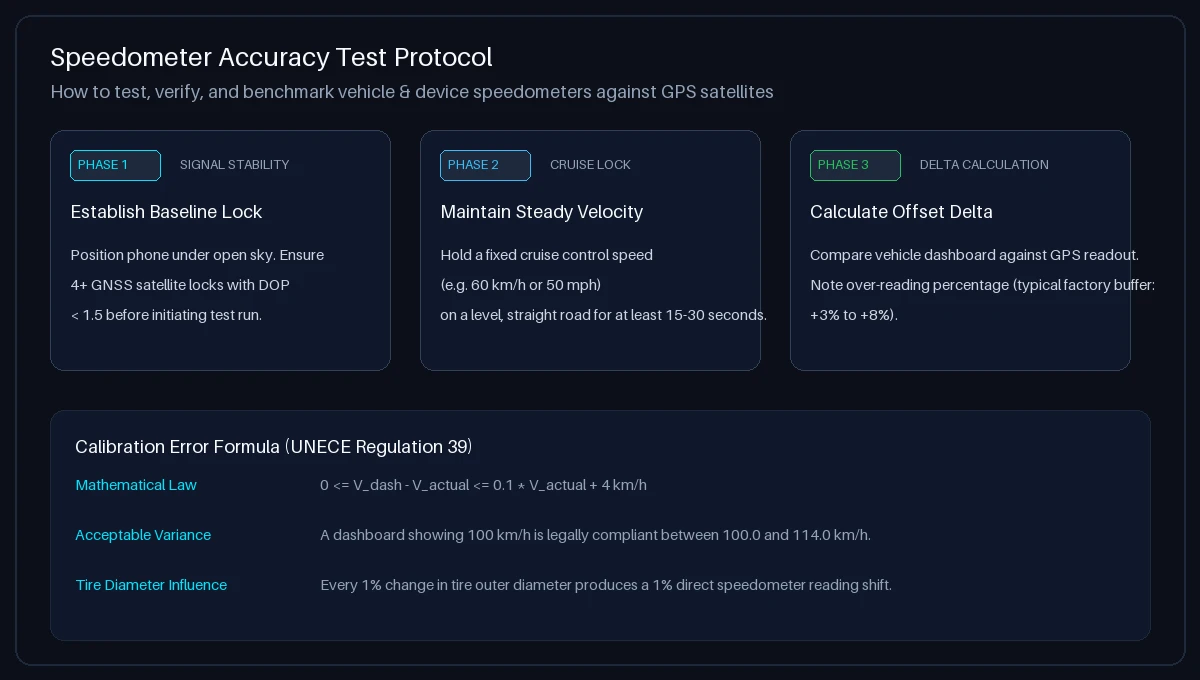
| Legal Over-Reading Buffer | 0% (Unbiased scientific measurement) | +2% to +10% positive bias by safety mandate |
| Tire Tread Wear Impact | None (Independent of vehicle running gear) | Worn tread decreases circumference, raising error |
| Aftermarket Wheel / Tire Size | None (Measures true ground distance) | Altered tire profiles cause 3%–12% dial discrepancy |
| Steady-State Benchmark Accuracy | Typically $\pm0.1\text{ m/s}$ in open sky conditions | Varies with mechanical tire pressure and wear |
For a complete breakdown of tire circumference mathematics and calibration formulas, read our dedicated Car Speed Test & Calibration Guide.
Testing Scenarios: Cars, Bikes, Transit & Running Pace
Troubleshooting: Speedometer Test Not Working or Showing 0?
Follow these quick troubleshooting steps to resolve GPS connection issues:
- iPhone / iPad (Safari): Go to iOS Settings → Privacy & Security → Location Services. Ensure Location Services is ON. Scroll to Safari Websites, select “While Using the App”, and toggle “Precise Location” to ON.
- Android (Chrome): Tap the Padlock / Controls icon in the Chrome address bar → select Permissions → tap Location → select “Allow”. Ensure high-accuracy location mode is active in Android system settings.
- Mac / Windows (Desktop): On macOS, ensure browser location is enabled under System Settings → Privacy & Security → Location Services. Note that laptops without hardware GPS chips rely on Wi-Fi positioning, which may have reduced responsiveness while in motion.
- Initial Signal Acquisition Delay: When launching the test from a cold start, allow 5 to 15 seconds for your device to acquire an initial satellite ephemeris lock before accelerating.
Frequently Asked Questions About Speedometer Testing
How do I test my speedometer online?
To test your speedometer online, open Speedometer Test in your browser, tap “Start Trip”, and grant location access. Drive or ride at a constant cruising speed on an open road and compare the GPS digital readout with your vehicle’s instrument cluster.
How accurate is an online GPS speedometer test?
Under open sky conditions with a clear line-of-sight to 4 or more navigation satellites, smartphone GPS speed testing is typically accurate to within ±0.1 m/s (approx. 0.36 km/h or 0.22 mph) at steady velocities.
Why does my car speedometer show a faster speed than the GPS test?
Car manufacturers calibrate vehicle speedometers to intentionally read 2% to 10% higher than actual speed to comply with international regulations (such as UNECE Regulation 39), which legally prohibit speedometers from ever under-reporting speed.
Can I test my speedometer on a bicycle or motorcycle?
Yes. The speedometer test functions anywhere your device receives satellite signals. It works on bicycles, motorcycles, cars, and public transit without requiring wheel sensors or wired magnets.
Do I need to install an app to test my speed?
No. This tool runs entirely in your mobile or desktop browser via HTML5 Geolocation. You can also add it to your home screen as a Progressive Web App (PWA) for quick offline-ready access.
How do changes in tire size affect speedometer test results?
Vehicle speedometers calculate speed from wheel revolutions. Fitting larger tires causes the car to travel farther per rotation than the computer expects, making the dashboard read slower. Installing smaller tires makes the dial read faster. A GPS speed test measures true ground speed regardless of tire size.
What is the difference between testing speed in km/h and mph?
KM/H (kilometers per hour) is the metric standard used globally, while MPH (miles per hour) is standard in the US and UK. One mph equals 1.60934 km/h. You can switch between units instantly during your test using the unit selector buttons or convert values with our Speed Converter.
Does the speedometer test track or store my location data?
No. Your privacy is fully preserved. All GPS coordinates and speed calculations are processed 100% locally in your client device’s browser memory. Zero location data or travel history is transmitted to or stored on our servers.
Can I test high-speed train or flight speeds with this tool?
Yes. By sitting near a window on a passenger train (Train Speed Tracker) or commercial aircraft (Flight Speed Tracker), your phone can receive satellite signals and test velocity up to commercial airline cruising speeds (800–950 km/h).
What should I do if the speed test shows “GPS: Blocked”?
Ensure your device location services are switched on, open your browser permission settings to allow location access for this site, and step outside or place your phone near a window with an unobstructed sky view.