GPS Speedometer — Real-Time Satellite Speed Tracker
Track your live speed across cars, motorcycles, bicycles, trains, flights, boats, and outdoor running — 100% private in your browser, no app download or external hardware required.
What Is a GPS Speedometer and How Does It Work?
Unlike conventional automobile speedometers that count axle or tire rotations, an online GPS Speedometer functions as an independent ground-speed instrument. It requires only two elements to operate:
-
1. Internal GNSS Hardware Receiver
Modern smartphones, tablets, and smart devices contain dedicated multi-band GNSS chipsets that continuously listen for radio broadcasts from GPS, Galileo, GLONASS, and BeiDou satellite constellations.
-
2. Browser Geolocation Interface (HTML5)
When you click Start Trip, our web application accesses the browser’s standard Geolocation API with high-accuracy mode enabled. The browser processes satellite telemetry locally in device memory to deliver instant velocity updates.
For quick access while on the move, you can also install this tool as a Progressive Web App (PWA) directly onto your device’s home screen.
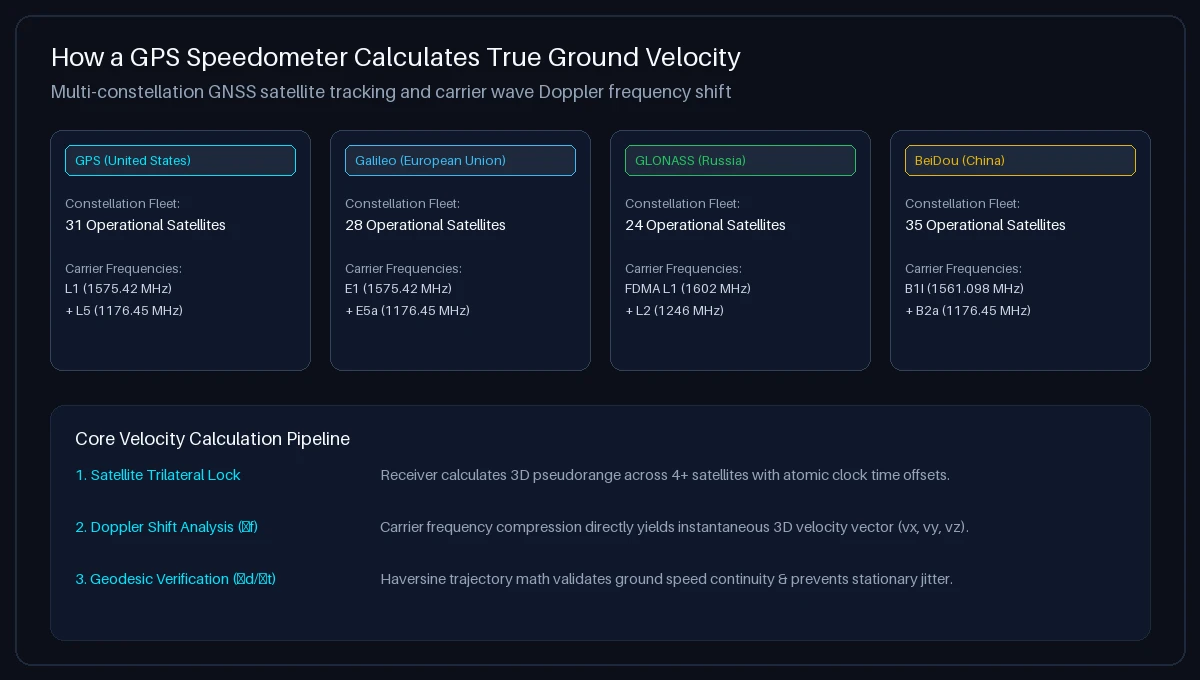
How GPS Calculates Real-Time Speed: Doppler Shift & Geodesics
The mathematical computation behind GPS velocity relies on two complementary scientific principles:
- Doppler Velocity Tracking (Primary): As your device moves toward or away from navigation satellites, the received radio carrier frequency (such as GPS L1 at 1575.42 MHz) compresses or stretches according to the relativistic Doppler effect. By analyzing phase shifts across 4 or more satellites simultaneously, the receiver solves for a complete 3D velocity vector (vx, vy, vz) with sub-second response times.
- Position Coordinate Delta (Δd/Δt): The receiver calculates the great-circle distance between consecutive latitude and longitude coordinates (φ₁, λ₁) and (φ₂, λ₂) over elapsed time (Δt). This validates trajectory continuity during steady-state cruising.
Curious to know how fast you are traveling right now on your route? Try our real-time How Fast Am I Going Live Tool.
GPS Speed Units: MPH vs. KM/H and Conversion Standards
Our GPS speedometer allows instant toggling between 4 international velocity standards:
- Kilometers per Hour (km/h): The universal standard for international road signage, automotive speed limits, and highway enforcement.
- Miles per Hour (mph): The standard legal measurement unit on highways and city streets across the United States and the United Kingdom.
- Meters per Second (m/s): The fundamental SI scientific unit, ideal for physics research and athletic running and sprint tracking (1 m/s = 3.6 km/h ≈ 2.237 mph).
- Nautical Knots (kn): Equal to one nautical mile per hour (1.852 km/h), essential for navigation on boats and aviation ground tracking on commercial flights.
Need to calculate exact conversions between different units? Use our interactive Speed Converter Calculator.
GPS Speed vs. Traditional Vehicle Speedometer
| Comparison Metric | GPS Speedometer (Online) | Traditional Vehicle Speedometer |
|---|---|---|
| Measurement Source | Satellite GNSS Doppler Shift (True Ground Velocity) | Transmission Sensor / ABS Tone Ring Revolutions |
| Manufacturer Over-Reading Offset | 0% (Unbiased scientific measurement) | +2% to +10% higher by legal regulatory design |
| Tire Wear & Profile Sensitivity | None (Independent of wheel diameter) | Worn tread or altered tire sizes skew dial by 2%–10% |
| Multi-Vehicle Portability | Universal (Car, bike, bus, train, boat, running) | Fixed permanently to one vehicle |
| Steady-State Precision | Typically ±0.1 m/s in open sky conditions | Subject to mechanical calibration drift |
To run a structured accuracy benchmark on your car’s instrument cluster, follow our Speedometer Accuracy Test Protocol or read our Car Speed Test Guide.
Factors Affecting GPS Speed Readings: Signal, Environment & Device
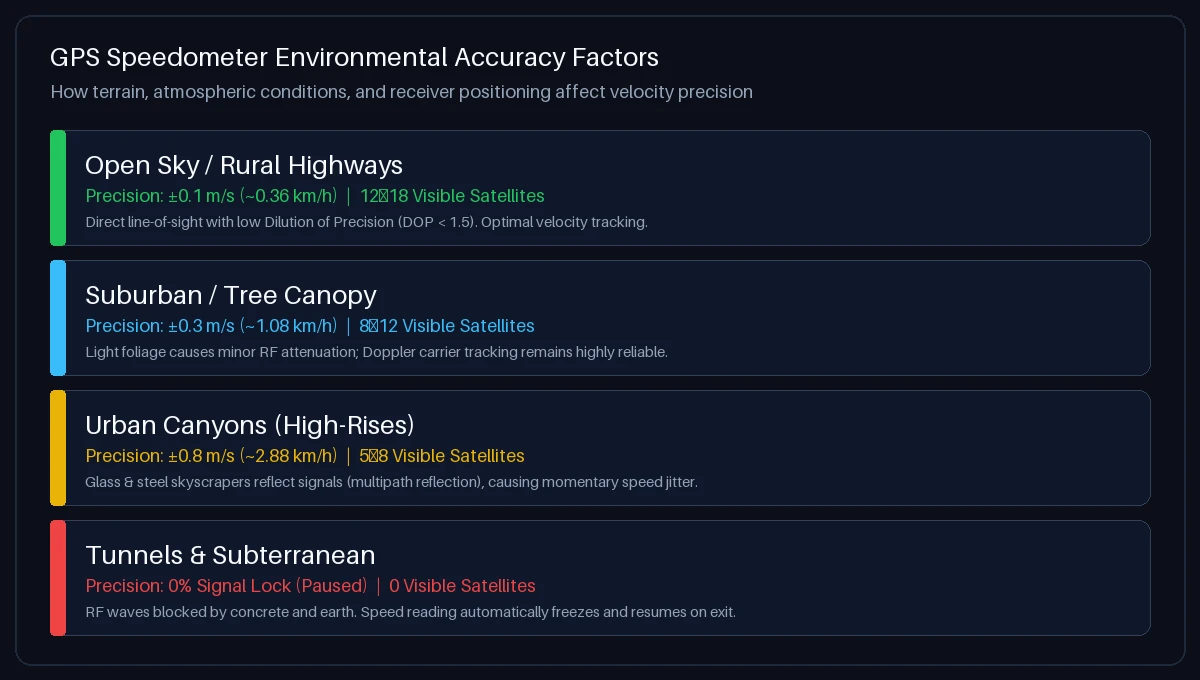
Consider how these environmental variables influence satellite telemetry:
- Open Sky vs. High-Rise Urban Canyons: On open highways, your device connects to 12–18 satellites with low Dilution of Precision (DOP < 1.5). In downtown city centers with dense skyscrapers, satellite radio waves bounce off glass facades (multipath interference), causing temporary speed jitter.
- Tunnels and Underground Structures: Concrete tunnels and subterranean parking block RF satellite transmissions entirely. Speed tracking automatically pauses and resumes once you exit.
- Steady Cruising vs. Sudden Deceleration: GPS speed is extraordinarily precise during constant cruising. During violent emergency braking, GPS updates may lag by 0.5 to 1.0 second compared to instantaneous mechanical wheel sensors.
- Device Mounting Position: In a vehicle, place your phone in a windshield mount. Placing devices in center consoles, glove boxes, or deep pockets attenuates RF reception through the metallic roof and chassis.
Practical Tips for Getting the Most Accurate GPS Speed Reading
Follow these best practices to ensure peak GPS telemetry precision:
- Enable High-Accuracy Mode: In device settings, ensure that “Precise Location” or “High Accuracy” is switched ON so your device utilizes hardware GNSS rather than cell tower triangulation.
- Allow 10–15 Seconds for Initial Signal Acquisition: When launching the tool from a cold start, wait a few moments for your phone to download satellite ephemeris data before driving off.
- Keep a Clear Line-of-Sight: Position your device near windows when traveling in trains, buses, or commercial aircraft.
- Use Trip Telemetry for Aggregate Analysis: Review average speed and total distance in the bottom dashboard to analyze overall trip metrics via our Speed Tracker.
Where Can You Use a GPS Speedometer?
Troubleshooting: Speedometer Not Working or GPS Blocked?
Follow these steps to restore location connectivity:
- Apple iOS (Safari on iPhone / iPad): Go to iOS Settings → Privacy & Security → Location Services. Select Safari Websites, choose “While Using the App”, and toggle “Precise Location” to ON.
- Android (Google Chrome): Tap the Tune / Padlock icon in the Chrome address bar → select Permissions → Location → choose “Allow”. Ensure Android high-accuracy location mode is active in system settings.
- Desktop Computers: On macOS, enable location under System Settings → Privacy & Security → Location Services for your browser. Note: Desktops without dedicated GPS chips rely on Wi-Fi positioning, which is less responsive during motion.
Frequently Asked Questions About GPS Speedometers
What is a GPS speedometer?
A GPS speedometer is a digital speed measurement tool that calculates your ground velocity using radio signals from orbiting navigation satellites (GNSS). Unlike vehicle speedometers that measure wheel rotations, GPS speed is independent of vehicle tire sizes and mechanical calibration.
How do I use this GPS speedometer online?
Open GPS Speedometer in your mobile or desktop browser, click “Start Trip”, and grant location permissions. As you begin moving, your live speed will immediately render on the digital and analog displays in km/h, mph, m/s, or knots.
How accurate is a GPS speedometer compared to a car’s speedometer?
Under open sky conditions with a clear satellite lock, a GPS speedometer is typically accurate to within ±0.1 m/s (approx. 0.36 km/h or 0.22 mph) at steady speeds. Car speedometers are intentionally calibrated to read 2% to 10% higher than actual speed to comply with automotive safety regulations (such as UNECE Regulation 39).
Do I need to download an app to use this GPS speedometer?
No. This tool runs directly in your web browser via HTML5 Geolocation. You can also add it to your home screen as a Progressive Web App (PWA) for fast, full-screen offline access without downloading anything from an app store.
Can I use this GPS speedometer on a bicycle or motorcycle?
Yes. The tool operates anywhere your device receives satellite signals. It works on bicycles, motorcycles, cars, and public transit without requiring wired magnets or wheel sensors.
Does this GPS speedometer work on trains and airplanes?
Yes. When seated near a window on a passenger train (Train Speed Tracker) or commercial aircraft (Flight Speed Tracker), your phone receives satellite signals and measures travel speed up to commercial flight cruising velocities (800–950 km/h).
What is HUD mode and how do I use it?
HUD (Head-Up Display) mode mirrors the speedometer readout vertically. When driving at night, place your smartphone face up on your dashboard below the windshield. The reflection projects your live speed directly into your line of sight on the glass.
Does this website record, track, or share my GPS location?
No. Your privacy is 100% protected. All GPS coordinates and velocity calculations are processed locally inside your browser memory. Zero location data or trip history is ever transmitted to or stored on our servers.
Why does the speedometer show 0 when I am standing still?
When you are completely stationary, minor atmospheric fluctuations in satellite signals can cause slight coordinate drift. Our engine applies stationary threshold filtering to keep the readout steadily at 0.0 until actual physical movement occurs.
How do I switch between MPH, KM/H, M/S, and Knots?
Tap any of the unit buttons (KM/H, MPH, M/S, KNOTS) located directly beneath the speedometer dial. The digital display, analog needle, and trip telemetry will update synchronously. You can also convert values with our Speed Converter Tool.