Online Speedometer — Check Your Current Speed Live
Free browser-based GPS speedometer and digital speedometer that reads your device’s satellite sensor directly. Works on phone and desktop. Install as an app if you want it on your home screen — otherwise just keep this tab open.
Live GPS Speed
True ground speed from your device’s GNSS chip — not an estimate. Updates every second when you move.
Digital, Analog & HUD
Large digital readout, classic analog needle, or mirrored HUD for windshield reflection at night.
Private by Design
Speed is calculated in your browser. No account, no tracking, no location stored on our servers.
4 Units, One Tap
Switch between km/h, mph, m/s, and knots. Need a table? Open the speed converter.
What is this online speedometer?
An online speedometer is a browser tool that shows your current speed using your phone or laptop’s built-in GPS — the same sensor maps use. You open this page, tap Start, and the speedometer online reads satellite data directly, then displays your live speed on a digital readout and analog gauge.
Unlike a car dashboard that estimates speed from wheel rotation, a GPS speedometer measures how fast you are actually moving over the ground. That makes it useful well beyond the driver’s seat — as a speed tracker for trips, a check against your vehicle’s dial, or simply to answer “what is my current speed right now?” without installing anything.
This page keeps the tool front and center. The guide below supports it — short, practical, and linked to deeper pages only where you need more detail.
How do I check my speed online?
-
1 — Open the speedometer
Keep this tab open on your phone or desktop. For frequent use, install it as an app — it then opens full-screen from your home screen.
-
2 — Allow location
Tap Start. When prompted, choose Allow (on iPhone: “Allow While Using the App”). Without this, the browser cannot read GPS. Troubleshooting tips are below if you accidentally tapped Block.
-
3 — Move and read your live speed
Walk, cycle, or drive and watch the large digits and needle update. Use km/h / mph / m/s / knots to switch units, and the mode button (⚙️) for Digital, Analog, or HUD. Your max speed, average speed, and distance update live underneath — see how the speed tracker works for details.
Tip: Keep your screen on and the browser in the foreground for the smoothest updates. Background tabs may pause GPS to save battery.
How does GPS-based speed measurement work?
Two complementary methods are combined:
- Doppler shift (primary): As you move toward or away from a satellite, its radio carrier frequency appears slightly higher or lower. Comparing this shift across several satellites gives an instantaneous velocity vector, typically every second.
- Position change over time (fallback): When Doppler data is briefly unavailable, speed can be derived from the distance between consecutive position fixes divided by time. This is less smooth during rapid acceleration but works well at steady pace.

Modern phones combine GPS with Galileo, GLONASS, and BeiDou satellites, which helps the fix stay stable even if one constellation is partly blocked. The result is a practical, real-world GPS speedometer that reflects how fast you are moving over ground, not how fast your wheels are turning.
Want the deeper technical version — including when Doppler is preferred over position delta and how accuracy is reported? Read the dedicated GPS speedometer guide.
MPH and km/h — which unit should you use?
- Kilometers per hour (km/h) — Standard for road signs and car dials across Europe, Asia, and most other regions. Good default if you are unsure.
- Miles per hour (mph) — Used in the United States, United Kingdom, and a few other markets. Useful when comparing against a US/UK dashboard or speed limit sign.
- Meters per second (m/s) — Handy for running pace, short sprints, and scientific contexts. Feels more granular at low speeds.
- Knots (kn) — One nautical mile per hour. Standard in marine and aviation contexts — see boat speedometer and flight speed.
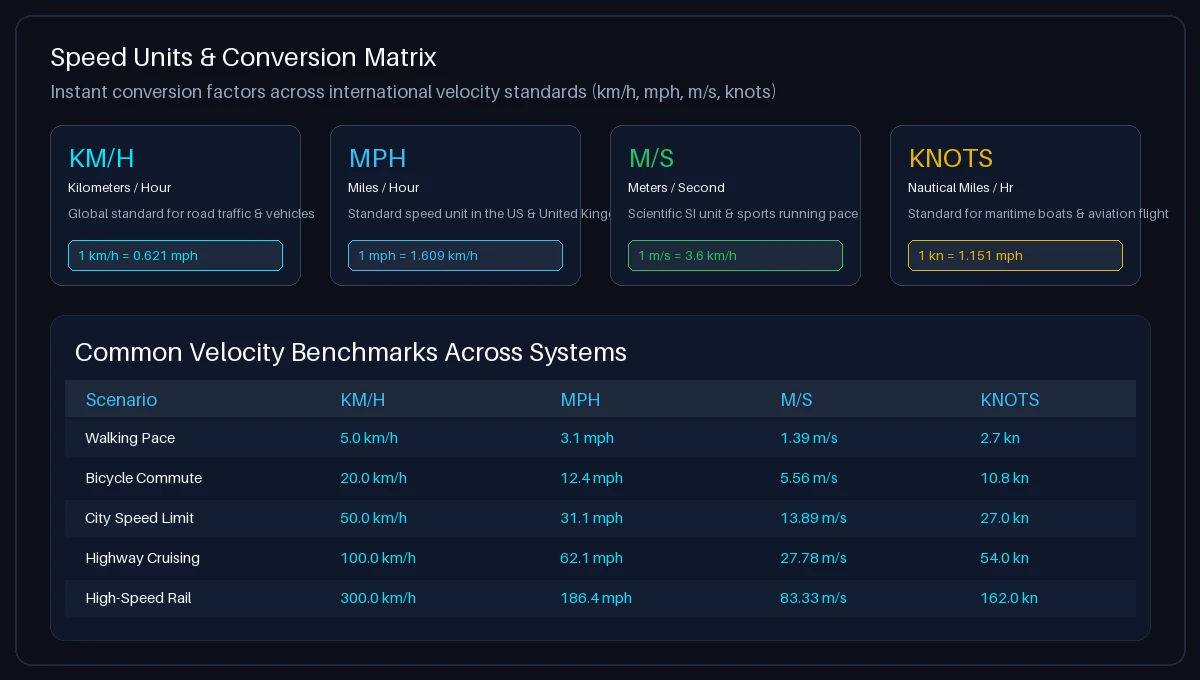
Quick conversions (exact, not rounded for limits): 1 mph = 1.60934 km/h · 1 m/s = 3.6 km/h · 1 knot = 1.852 km/h. For precise tables and a live calculator, open the speed converter.
How accurate is the speed reading, and what affects it?
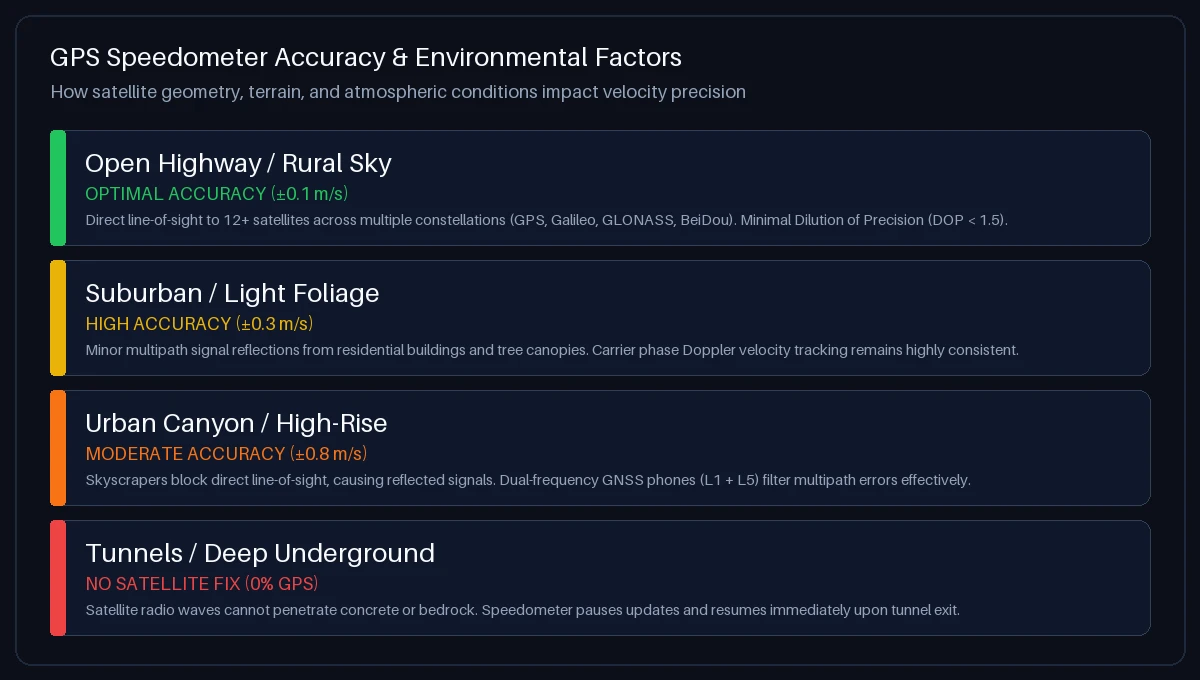
GPS accuracy is not a single number. These factors matter most:
- Sky view: Open highways and parks give the cleanest signal. Deep urban canyons, dense tree cover, and tunnels can weaken or block satellites, causing the fix to wobble or pause until you emerge.
- Steady vs. sudden movement: At a steady walk, cycle, or cruise, readings are smoothest. During very abrupt braking or sharp turns, GPS may lag briefly by a second or so compared to a wheel sensor.
- Device and settings: Newer phones that use multiple constellations (GPS + Galileo + GLONASS + BeiDou) and have High Accuracy location enabled tend to hold a steadier fix.
- Low speeds: At near-zero speed, small position jitter can make the readout flicker between 0 and a low value. Standing still for a moment usually settles it.
For a controlled comparison, you can test your speedometer accuracy against GPS on a straight, open road.
Where can you use an online speedometer?
Also useful for boats (knots), flights (ground speed near a window), and as a lightweight trip speed tracker that logs max, average, and distance while you move.
Safety note: If you are driving, mount the phone securely and avoid interacting with the screen while the vehicle is moving. Glance briefly, just as you would a dashboard.
Speed not showing? Fix location permissions
- Chrome (Android/Desktop): Tap the lock icon in the address bar → Site settings → Location → Allow → reload and tap Start.
- Safari (iPhone/iPad): Settings → Privacy & Security → Location Services → Safari Websites → Allow While Using App. Then reload this page.
- Still at 0? Move outdoors, keep the browser in the foreground, and ensure High Accuracy / Precise Location is enabled on your device. Indoors or in tunnels, GPS may pause until satellites are visible again.
- Speed jumps while standing still? Small GPS jitter at rest is normal. Stand still a few seconds; the readout should settle to 0.
Detailed permission guides and diagnostics are on How Fast Am I Going — including what to do if you previously tapped “Block.”
GPS speed vs. traditional vehicle speedometers
| Aspect | GPS speedometer (this tool) | Vehicle dashboard speedometer |
|---|---|---|
| What it measures | Ground speed via satellite signals | Wheel/gearbox rotation |
| Affected by tire size or wear? | No | Yes — different diameter or worn tread changes the reading |
| Typical calibration | Shows calculated ground speed | Often reads slightly high intentionally (regulatory margin) |
| Works across vehicles? | Yes — car, bike, bus, train, boat, on foot | Only for the vehicle it is built into |
| Limitations | Needs satellite view; may lag a moment during abrupt changes | Can drift with mechanical factors; no satellite dependency |

If you notice your car dial consistently reads higher than GPS, that is expected — learn why and how to check it properly on the car speed test page and the broader speedometer test guide.
Online speedometer — FAQs
How do I check my current speed right now?
Tap Start at the top of this page and allow location access. Your current speed appears instantly as a large number and on the analog needle. Switch between km/h, mph, m/s, and knots with one tap, or open the speed converter to convert a specific value.
Do I need to download an app to use the speedometer?
No. This speedometer online runs entirely in your browser. You can also install it as a PWA so it opens full-screen from your home screen like an app, but no App Store download is required.
How does an online GPS speedometer work?
Your phone listens to navigation satellites. By measuring the Doppler shift of their signals and how your position changes over time, it calculates true ground speed. See the GPS speedometer guide for the full explanation.
What is the difference between live speed, current speed, and average speed?
Live speed and current speed both mean your instantaneous speed right now — the big number at the top. Average speed is the mean over your trip so far, shown in the telemetry cards below the gauge. Speed tracker explains max, average, and distance in detail.
Why does my car speedometer show a higher speed than GPS?
Most vehicle speedometers are intentionally calibrated to read slightly high to create a safety margin, and they can drift further with tire wear, pressure changes, or different wheel sizes. GPS measures ground speed directly, so it is not affected by those factors. Use the car speed test to compare them side by side.
How accurate is this speedometer?
At steady speed under open sky, it is generally very usable for everyday checks. Accuracy depends on satellite view, device, and whether you are moving steadily. Avoid treating it as a certified instrument for legal or enforcement purposes. For a structured check, follow the speedometer test protocol on a straight, open road.
Can I use this as a digital speedometer on my bike or while running?
Yes. As a digital speedometer, it works wherever your phone has GPS — on a bike, motorcycle, while running, or walking. Mount your phone securely on handlebars or keep it in a pocket with the screen on.
Does this site track or store my location?
No. Speed is calculated locally in your browser. We do not ask for an account and we do not store your location or trip history on our servers. Closing the tab clears the in-memory trip data.
How do I switch between km/h, mph, m/s, and knots?
Use the unit pills below the gauge (KM/H, MPH, M/S, KNOTS). The needle scale, digital readout, and telemetry labels update together. For conversions without moving, use the speed converter.