Bus Speed Test — Check & Track Current Bus Speed Online
Check how fast your city transit bus, BRT dedicated-lane express, or intercity motorcoach is traveling. Monitor route speeds, schedule pace, and trip distance — 100% private in your browser, no app installation needed.
How to Check a Bus’s Current Speed Online in 3 Steps
-
1. Launch the Online Transit Speedometer
Keep this page open on your smartphone browser (Safari, Chrome, Firefox, or Edge). If you commute daily, you can install this tool as a Progressive Web App (PWA) for instant 1-tap full-screen access from your phone’s home screen.
-
2. Enable GPS & Sit Near a Window
Click Start Trip. When prompted, select “Allow While Using App”. Sitting near a side window provides a clear line-of-sight to orbiting satellites through the glass, bypassing the metal roof shielding of the bus body.
-
3. Monitor Live Transit Telemetry
As the bus accelerates away from the bus stop, the digital gauge displays the vehicle’s instantaneous speed. Switch between KM/H and MPH, or review maximum speed and average trip velocity in the bottom telemetry bar.
Want to log your entire commuter transit route from departure to arrival? Explore our Speed Tracker Telemetry Guide for continuous distance and velocity tracking.
How GPS Measures Moving Vehicle Speed on a Bus
Passengers do not need access to the bus’s mechanical dashboard or CAN-bus telemetry. A browser-based GPS Speedometer calculates ground velocity through two core scientific techniques:
- Doppler Frequency Shift ($\Delta f$): As the bus travels along streets or highways, the radio waves received from navigation satellites orbiting at 20,200 km altitude shift in frequency according to the Doppler effect. By analyzing carrier phase shifts across 4 or more satellites simultaneously, your phone calculates 3D velocity ($v_x, v_y, v_z$) every second.
- Position Coordinate Delta ($\Delta d / \Delta t$): The receiver calculates great-circle displacement between consecutive latitude and longitude fixes using the Haversine trigonometric formula, verifying cumulative route mileage and average pace between stops.
Curious about your speed across other transit methods? Compare with our guides for car speed testing and high-speed train tracking.
Bus Speed Units: MPH vs. KM/H
You can toggle between units on the fly with a single tap during your bus ride:
- Kilometers per Hour (km/h): Used by municipal bus transit authorities, BRT networks, and highway speed signs worldwide.
- Miles per Hour (mph): Standard for city transit and interstate motorcoach travel across the US and UK.
- Meters per Second (m/s): Fundamental SI unit useful for physics analysis and rapid acceleration measurements ($1\text{ m/s} = 3.6\text{ km/h} \approx 2.237\text{ mph}$).
Need to convert travel schedules or speed limits between international systems? Use our Speed Converter Calculator.
How Fast Does a Bus Typically Go? City vs. Highway Speeds
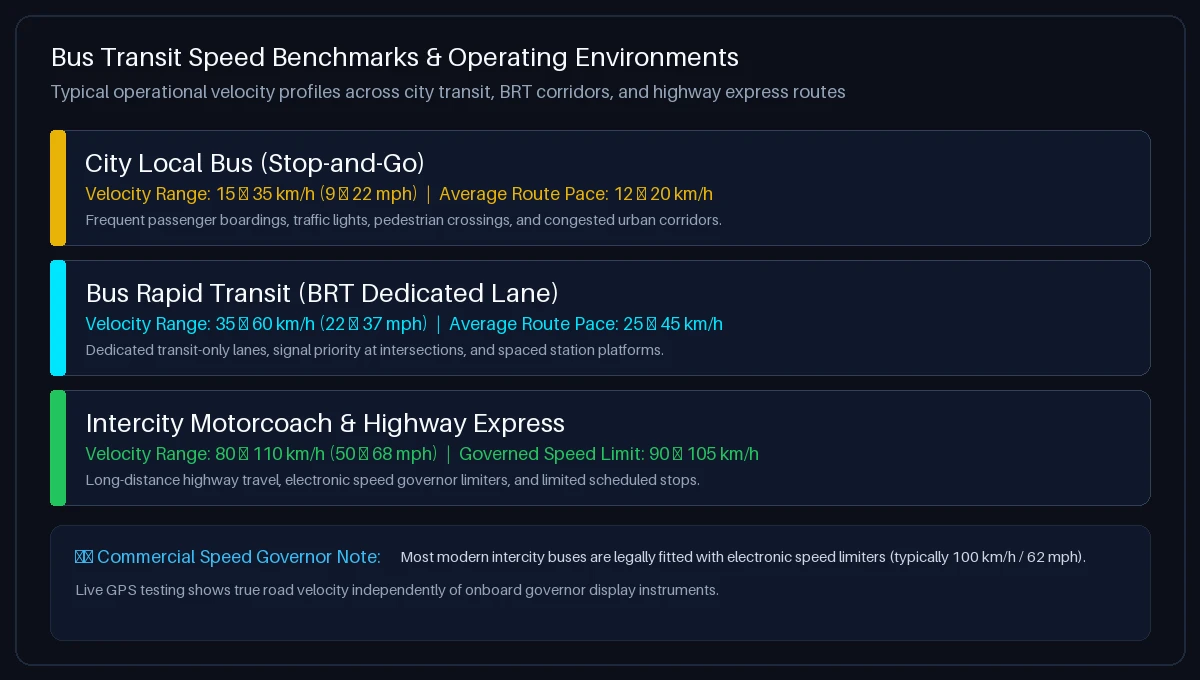
When analyzing your live bus speed reading, keep these operational context ranges in mind:
- City Local Transit (Stop-and-Go): In congested urban centers, buses rarely maintain high speeds. Traffic signals, passenger boardings, crosswalks, and delivery trucks keep average route speeds between 12 and 20 km/h (7–12 mph), even if the bus briefly hits 40 km/h between stops.
- Bus Rapid Transit (BRT) Corridors: BRT systems utilize dedicated bus-only lanes, off-board ticketing, and traffic signal priority. This allows vehicles to maintain cruising speeds of 40–60 km/h (25–37 mph) with significantly higher average journey velocity.
- Intercity Coaches & School Buses: Long-distance commercial coaches (Greyhound, FlixBus, Megabus) cruise at standard highway limits of 90–110 km/h (55–70 mph). In many jurisdictions, commercial buses are legally fitted with electronic speed limiters (governors) capped at 100 km/h (62 mph) for passenger safety.
Want to check your exact speed right now while in transit? Try our live How Fast Am I Going Tool.
Factors Affecting Bus Speed Readings & Seating Position
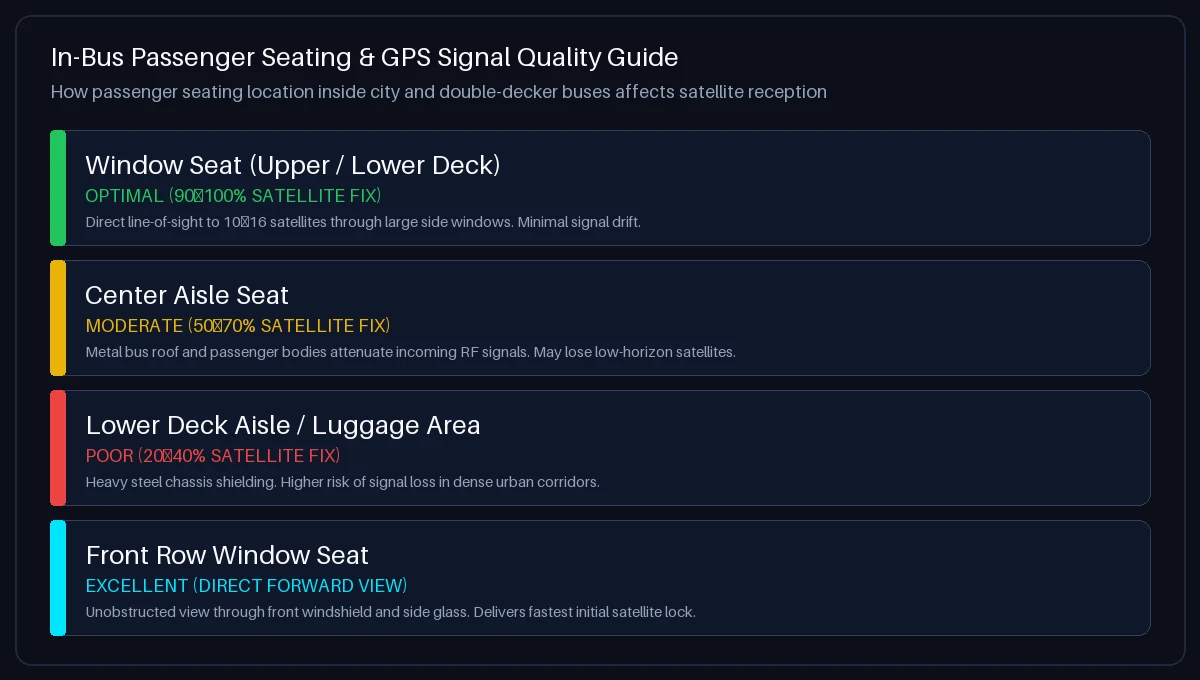
To ensure your bus speed test produces reliable data, consider these physical factors:
- Window Seat vs. Center Aisle: The steel and aluminum roof of a bus acts as a Faraday shield that blocks overhead satellite signals. Sitting directly next to a large side window or in the front row facing the windshield gives your phone direct line-of-sight to 10–16 satellites.
- Double-Decker Buses: On double-decker buses, the top deck (especially the front row) offers exceptional 360-degree sky visibility and the fastest satellite lock. The lower deck has more structural metal shielding.
- Urban Canyons & Multi-Lane Avenues: Towering skyscrapers in downtown business districts reflect satellite radio signals (multipath reflection), which can cause brief speed fluctuations of ±1–3 km/h. Accuracy stabilizes as the bus reaches wider avenues or open highways.
- Bus Terminals & Underground Transit Tunnels: Subterranean bus stations and highway tunnels block satellite signals completely. The speedometer will automatically pause and resume within 3–8 seconds after returning to surface roads.
Passenger Safety Guidelines: Testing Bus Speed Responsibly
When testing bus speed, passenger safety and courtesy are paramount:
- Remain Safely Seated: Always stay seated while the bus is in motion. Never walk in the aisle or lean toward the driver’s cabin while operating your phone.
- Do Not Distract the Driver: Public transit drivers must focus entirely on road conditions and passenger safety. Never question or distract the driver regarding speedometer readings.
- Understand Speedometer Calibration Buffers: Commercial bus dashboard dials are calibrated to read 2% to 10% higher than actual ground speed under international regulations (UNECE Regulation 39). A GPS reading showing slightly below the dashboard dial is normal and expected.
To learn more about automotive speedometer calibration laws, read our Speedometer Accuracy Test Guide.
Troubleshooting: Speed Not Showing or GPS Blocked on a Bus?
Follow these quick troubleshooting steps:
- iPhone / iPad (Safari): Go to iOS Settings → Privacy & Security → Location Services. Select Safari Websites, set to “While Using the App”, and ensure “Precise Location” is toggled ON.
- Android (Google Chrome): Tap the Tune / Padlock icon in Chrome’s address bar → tap Permissions → Location → choose “Allow”. Ensure Android high-accuracy location is enabled in system settings.
- Signal Delay After Underground Stops: If the bus just emerged from an underground terminal or tunnel, allow 10 to 15 seconds for your device to re-acquire an ephemeris lock with orbiting satellites.
Frequently Asked Questions About Bus Speed Testing
How can I check how fast my bus is going?
To check how fast your bus is going, open Bus Speed Test on your smartphone, tap “Start Trip”, allow location permissions, and hold your phone near a window. Your current speed will display immediately in km/h or mph using satellite GPS.
How fast does a city transit bus usually travel?
City transit buses typically cruise between 25 and 45 km/h (15–28 mph) on urban streets. However, because of frequent passenger stops, traffic lights, and congestion, their overall average route speed is usually between 12 and 20 km/h (7–12 mph).
How fast do long-distance highway motorcoaches travel?
Intercity express motorcoaches (such as Greyhound or FlixBus) typically travel at highway speeds of 90 to 110 km/h (55–68 mph), subject to local road speed limits and commercial electronic speed governors.
Do buses have speed limiters installed?
Yes. In many countries across Europe, North America, and Australasia, commercial buses and school buses are legally mandated to have electronic speed governors that mechanically restrict maximum vehicle speed (often capped at 100 km/h or 62 mph).
How accurate is a phone GPS speedometer inside a bus?
When seated near a window with an unobstructed view of the sky, phone GPS speed measurement is typically accurate to within ±0.1 m/s (approx. 0.36 km/h or 0.22 mph) at steady cruising speeds.
Where is the best place to sit on a bus for accurate speed testing?
A window seat (or the front row of the upper deck on a double-decker bus) provides the best satellite reception. Center aisle seats receive attenuated signals because the metal roof shields incoming radio waves.
Do I need to download an app to test bus speed?
No. This tool runs directly in your web browser using HTML5 Geolocation. You can also save it as a Progressive Web App (PWA) for fast home screen access without visiting an app store.
Does this tool track or store my bus travel history?
No. Your privacy is fully protected. All GPS velocity calculations and trip telemetry are processed 100% locally in your device’s browser memory. Zero location data is ever transmitted to or stored on our servers.
Why does the speedometer show 0 when the bus stops at a station?
When the bus comes to a complete halt, our stationary threshold filter locks the display to 0.0 to prevent minor satellite drift from causing erratic fluctuations while passengers board.
How do I switch between KM/H and MPH on the bus speedometer?
Tap the KM/H or MPH pill buttons directly below the dial. The speedometer readout, dial scale, and average trip statistics will update synchronously.