How to Show Your Speed on Google Maps
- 1. Open settings
Tap your profile picture or initial in the top-right corner, then Settings.
- 2. Go to navigation settings
Tap Navigation (on Android it may say Navigation settings).
- 3. Turn on Speedometer
Under Driving options, switch on Speedometer. In many areas you can also turn on Speed limits.
- 4. Start driving directions
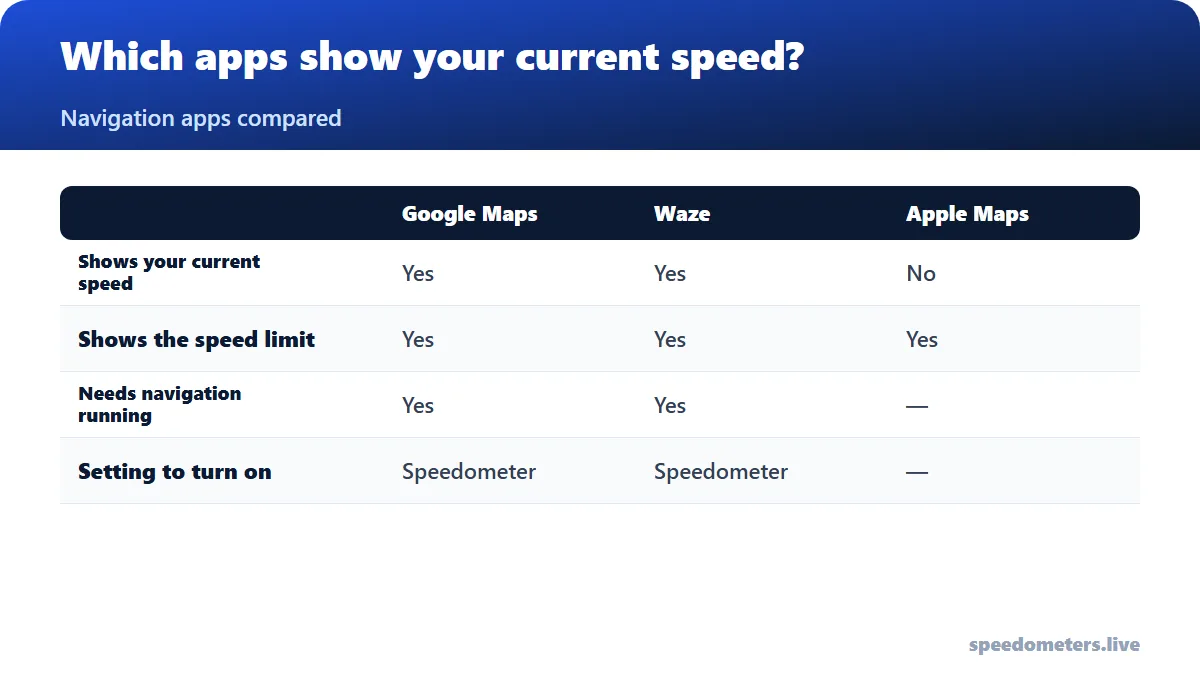
The speedometer only appears during navigation in driving mode, not while you are just looking at the map.
The speedometer reached iPhone and CarPlay later than Android, so make sure the app is up to date. Menu names can differ slightly by version and region. Google describes the speedometer as informational only, so treat your car’s dashboard as the reference.
How to Show Your Speed on Waze
When you exceed the limit you set, the Waze speedometer turns red and can play a sound. If you use Waze through Android Auto or CarPlay, change these settings on the phone first; they carry over to the car screen.
Can Apple Maps Show Your Speed?
The speed limit sign can be switched on or off in the iPhone’s Settings under Maps → Driving.
Why the App Shows a Different Speed Than Your Car
Map apps, Waze and our tool all use GPS, which measures your true speed. Car speedometers are usually set to read a little high, so a difference of 1–3 mph (2–5 km/h) at highway speed is normal. Updates can also lag by a second or two when you accelerate or brake. Learn more in our speedometer accuracy test.
Frequently Asked Questions
Why can’t I see the speedometer in Google Maps?
Check that Speedometer is turned on in Settings → Navigation, that the app is updated, and that you are using driving directions. It does not appear while browsing the map or in walking or cycling mode.
Is the Google Maps speedometer accurate?
It uses GPS, which is usually within a few km/h of your true speed in open sky. Google says it is for information only; your vehicle’s speedometer remains the legal reference.
Can Google Maps warn me when I’m speeding?
Where speed-limit data is available, the speedometer changes color when you exceed the limit. Waze offers a configurable speeding alert with sound.
How do I see my speed on an iPhone without an app?
Open our online speedometer in Safari, tap Start and allow location access. Nothing needs to be installed.