Design
Display
Units
Speed is worked out on your device and never uploaded. The map loads tiles for your area from OpenStreetMap and Esri.
Trips are saved in this browser when you press Reset.
No saved trips yet.
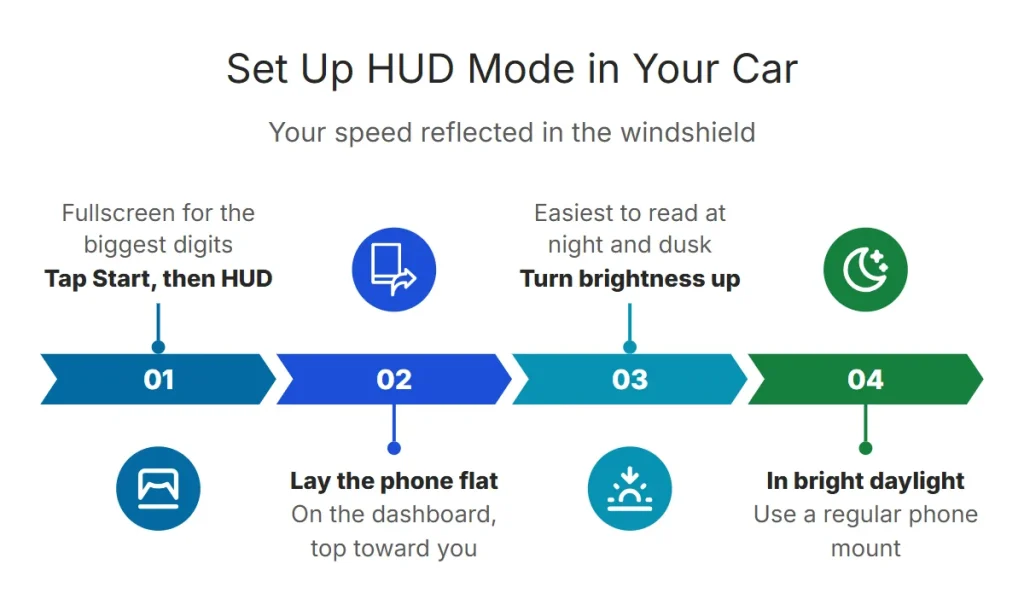
How to Use HUD Mode in Your Car
- 1. Start and switch to HUD
Tap Start, allow location, then tap the shield-shaped HUD button. Use Fullscreen for the biggest digits.
- 2. Lay the phone flat
Place it screen-up on the dashboard below the windshield, on a non-slip mat, with the top of the phone facing you.
- 3. Turn brightness up
The reflection is easy to read at night and at dusk. In bright sunlight it fades — use a regular phone mount during the day.
Some dashboards are too curved or reflective. A small black mat under the phone, or a HUD reflective film on the glass, sharpens the image.
Safety and the Law
Why a HUD Speedometer Helps
- Your eyes stay closer to the road than when glancing down at the cluster.
- It shows true GPS speed, which is usually a little lower than the dashboard — see why speedometers read high.
- It works in older cars, rentals and cars with a broken speedometer — see speedometer not working.
- Pair it with the over-speed alert for a warning when you exceed a set speed.
Frequently Asked Questions
How do I turn on HUD mode?
Tap the shield-shaped HUD button at the top of the speedometer. Tap it again to switch back.
Why can’t I see the reflection in daylight?
Phone screens aren’t bright enough to beat direct sunlight on glass. HUD reflection works best at night, at dusk or under cloud.
Does HUD mode work on a motorcycle?
Only with a suitable reflective screen. Most riders use a regular handlebar mount — see the motorcycle speedometer.
Do I need an app for a HUD speedometer?
No. It runs in the browser; you can add it to your home screen for quick access.