Why GPS Doesn’t Need the Internet
Your phone’s GPS chip listens to radio signals broadcast by satellites (GPS, Galileo, GLONASS, BeiDou) and calculates position and speed itself. Data only helps in two ways: it lets the phone find satellites faster after being switched off (assisted GPS), and it loads maps. A speedometer needs neither once it’s running.
How to Use the Speedometer Offline
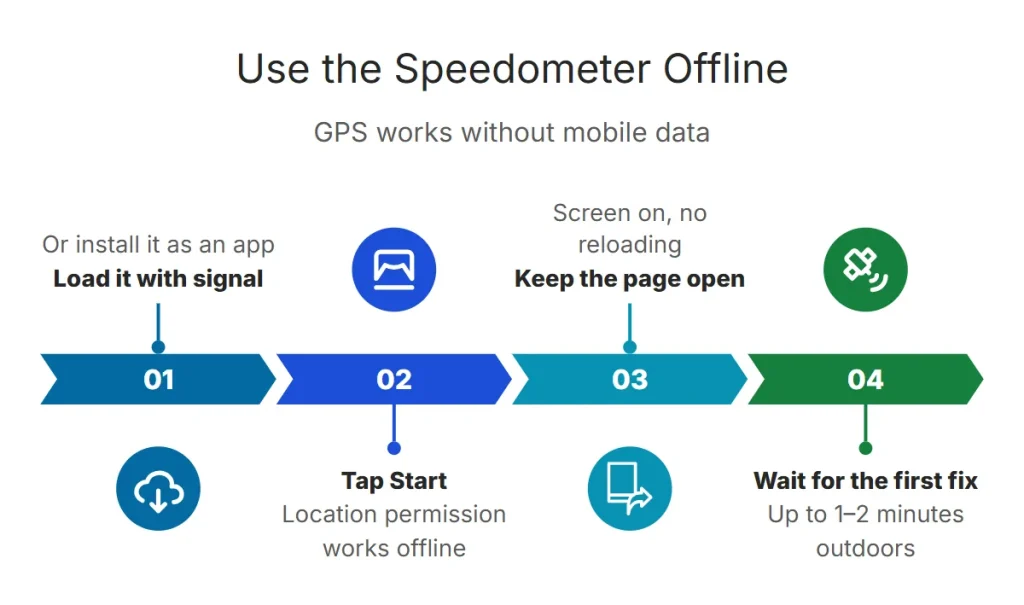
- 1. Load it while you have signal
Open the online speedometer before you lose coverage — or install it as an app so it opens from your home screen any time.
- 2. Tap Start and allow location
Location permission works offline; it’s a device setting, not an internet one.
- 3. Keep the page open
Don’t reload the page while offline. Keep the screen on, because browsers pause GPS for background pages.
Does It Work in Airplane Mode?
That makes it handy on flights (window seat), cruises and remote trips. See using a GPS speedometer on a plane.
If Speed Stays at Zero Offline
- The first fix can take longer without data — up to a minute or two outdoors.
- Check that location services are on and the browser has location permission.
- Move to open sky; tunnels, garages and dense cities block satellites.
Frequently Asked Questions
Does a GPS speedometer use mobile data?
Only to load the page. Speed is calculated from satellite signals, which are free and don’t use data.
Is there a speedometer that works without GPS?
Not reliably on a phone. Some apps estimate speed from cell towers or Wi-Fi, which is far too coarse. GPS is what makes phone speed accurate.
Does it work abroad without roaming?
Yes. Load it on hotel Wi-Fi, then use it with roaming switched off.